 Canvas
CSRF Protection
Cross-Site Request Forgery (CSRF) protection in Canvas uses token-based validation to ensure requests originate from your application, preventing malicious sites from performing unauthorized actions on behalf of your users.
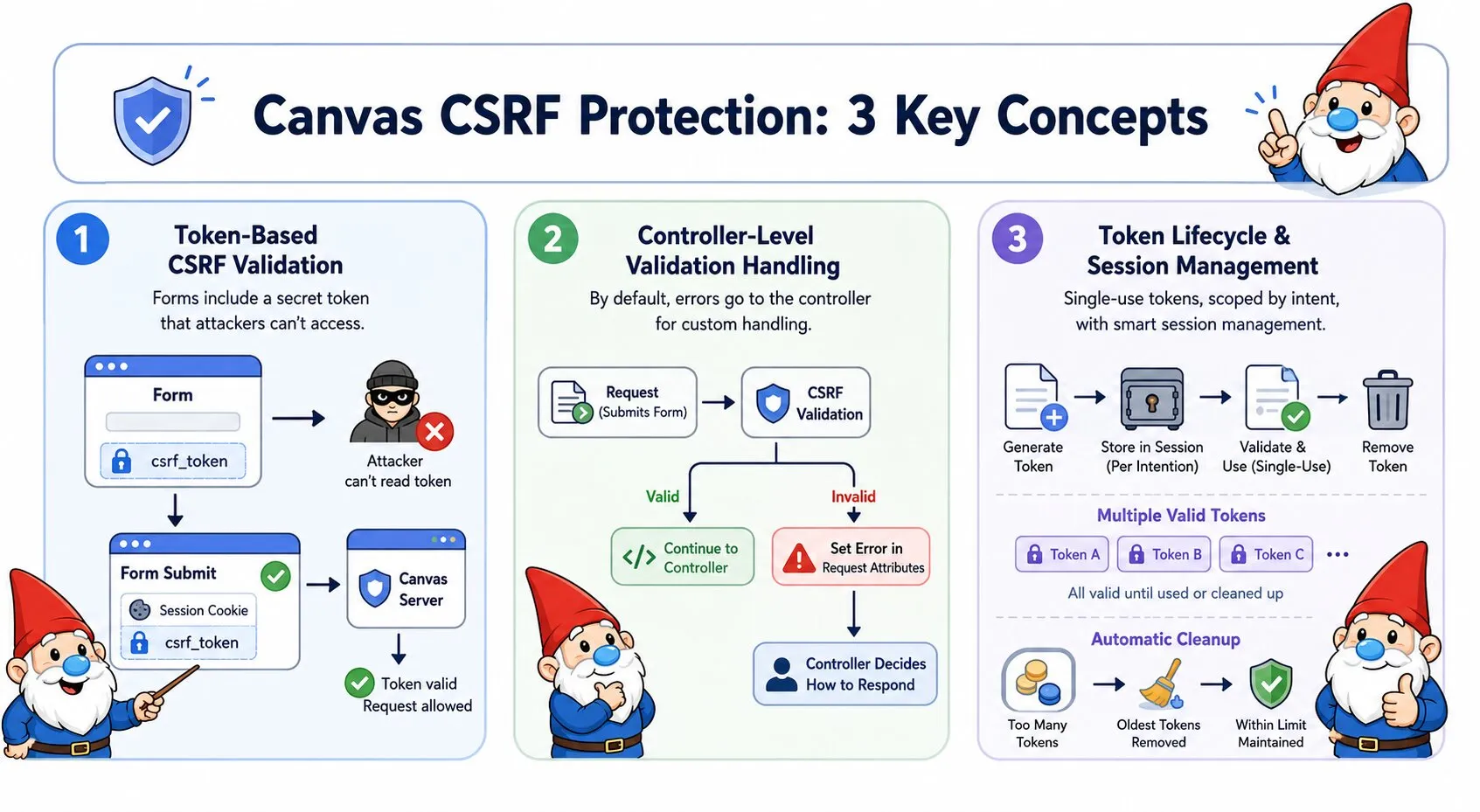
CSRF Attacks Explained
The Attack: A malicious website submits requests to your application on behalf of authenticated users. Because browsers automatically attach session cookies to all requests to your domain - regardless of which site initiated the request - your application processes these forged requests as if the user intentionally made them.
The Consequences: Without CSRF protection, attackers can change passwords, make purchases, delete data, execute any action the authenticated user has permission to perform.
Why Your Application Can't Tell the Difference: Session cookies authenticate the request, but they don't prove the user intentionally initiated it. A legitimate form submission from your site and a forged request from an attacker's site both arrive with valid session cookies. Your application has no way to distinguish between them.
How Canvas CSRF Protection Works
Canvas embeds a secret token in every form. When the form is submitted, Canvas verifies this token exists and matches what was originally generated. Because attackers cannot access tokens from your domain (browsers block cross-origin data access), forged requests arrive without valid tokens and are rejected before any damage occurs.
What is a token?
A token is a cryptographically secure random string (256 bits) that Canvas generates and stores in the user's session. Think of it as a secret password that only your application and the user's browser know. External sites cannot access this token because browsers enforce same-origin policy - a malicious site cannot read data from your domain.
How validation works:
- When Canvas displays a form (GET request), it generates a token and embeds it as a hidden field in your HTML
- When the user submits the form (POST request), the browser sends both the session cookie and the hidden token field
- Canvas compares the submitted token against tokens stored in the user's session
- If the token matches: the request is legitimate, Canvas processes it and removes the token (single-use)
- If the token is missing or doesn't match: the request is rejected with HTTP 403
Basic Usage
Apply CSRF protection to your controller methods using the @InterceptWith annotation. Canvas provides two modes of operation:
Default Behavior
By default, CSRF validation failures write error details to the request attributes and continue to your controller, giving you full control over the error response:
<?php
namespace App\Controllers;

use Quellabs\Canvas\Annotations\Route;
use Quellabs\Canvas\Annotations\InterceptWith;
use Quellabs\Canvas\Security\CsrfProtectionAspect;
use Symfony\Component\HttpFoundation\Request;

class ContactController extends BaseController {

    /**
     * @Route("/contact", methods={"GET", "POST"})
     * @InterceptWith(CsrfProtectionAspect::class)
     */
    public function contact(Request $request) {
        // CSRF validation happens before this point.
        // On failure: csrf_validation_succeeded is set to false and execution continues here.
        // On success: csrf_validation_succeeded is set to true and execution continues here.
        if ($request->attributes->get('csrf_validation_succeeded') === false) {
            $error = $request->attributes->get('csrf_error');

            return $this->render('contact.tpl', [
                'errors' => ['security' => $error['message']],
                'csrf_token' => $request->attributes->get('csrf_token'),
                'csrf_token_name' => $request->attributes->get('csrf_token_name')
            ]);
        }

        if ($request->isMethod('POST')) {
            $this->processContactForm($request);
            return $this->redirect('/contact/success');
        }

        return $this->render('contact.tpl', [
            'csrf_token' => $request->attributes->get('csrf_token'),
            'csrf_token_name' => $request->attributes->get('csrf_token_name')
        ]);
    }
}
Exception Mode
Use throwOnFailure=true to throw a CsrfTokenException on validation failure instead of writing error details to request attributes and continuing. Your controller method never executes when validation fails — Canvas's exception handler takes over:
/**
 * @Route("/contact", methods={"GET", "POST"})
 * @InterceptWith(CsrfProtectionAspect::class, throwOnFailure=true)
 */
public function contact(Request $request) {
    // If validation failed: CsrfTokenException is thrown, this code never runs.
    // If validation succeeded: execution continues normally.
    if ($request->isMethod('POST')) {
        $this->processContactForm($request);
        return $this->redirect('/contact/success');
    }

    return $this->render('contact.tpl', [
        'csrf_token' => $request->attributes->get('csrf_token'),
        'csrf_token_name' => $request->attributes->get('csrf_token_name')
    ]);
}
When to use exception mode:
- Simple endpoints where a generic error response is acceptable
- API endpoints where clients handle HTTP error codes programmatically
- When you have a central exception handler that already formats error responses consistently
- Situations where you want to guarantee the controller never runs on failure
Template Integration
Include the CSRF token in your HTML forms as a hidden input field:
<form method="POST" action="/contact">
    <input type="hidden" name="{$csrf_token_name}" value="{$csrf_token}">

    <div class="form-group">
        <label for="email">Email:</label>
        <input type="email" id="email" name="email" required>
    </div>

    <div class="form-group">
        <label for="message">Message:</label>
        <textarea id="message" name="message" required></textarea>
    </div>

    <button type="submit">Send Message</button>
</form>
AJAX Protection
For AJAX requests, include the CSRF token in request headers. The aspect checks POST data first, then falls back to headers if no token is found in the request body.
JavaScript Integration
Make the token available to JavaScript via a meta tag:
<!-- In your template head section -->
<meta name="csrf-token" content="{$csrf_token}">
Include the token in AJAX requests:
// Get token from meta tag
const csrfToken = document.querySelector('meta[name="csrf-token"]').getAttribute('content');

// Include in AJAX requests
fetch('/api/users', {
    method: 'POST',
    headers: {
        'X-CSRF-Token': csrfToken,
        'Content-Type': 'application/json'
    },
    body: JSON.stringify({
        name: 'John Doe',
        email: 'john@example.com'
    })
});
Token Lifecycle
How Tokens Work
Canvas automatically manages token security with the following behavior:
GET Requests (Token Retrieval):
- Returns the most recent token if one exists for the intention
- Generates a new token only if no tokens exist
- Does not consume the token
POST Requests (Token Consumption):
- Token is validated against all stored tokens for the intention
- If valid, the token is removed from session (single-use)
- A fresh token is generated and added to request attributes for the response
Token Properties:
- Single-Use - Tokens are consumed after successful validation
- Multiple Valid Tokens - Up to maxTokens tokens can be valid simultaneously (supports multiple open tabs/forms)
- Intention Scoping - Different token namespaces for different actions
- Automatic Cleanup - When maxTokens limit is exceeded, oldest tokens are discarded
- Cryptographically Secure - 32 bytes (256 bits) generated using PHP's
random_bytes() - Session Storage - Stored under
_csrf_tokenskey, organized by intention
Multiple Tabs Example
// User opens form in 3 browser tabs
GET /contact → receives token "abc123"
GET /contact → receives token "abc123" (same most recent token)
GET /contact → receives token "abc123" (same most recent token)

// User submits from tab 1
POST /contact token="abc123" → valid, token consumed, fresh token generated

// User submits from tab 2 (token already consumed)
POST /contact token="abc123" → invalid, CSRF validation fails

// Solution: increase maxTokens and ensure GET always issues a fresh token
// so each tab holds its own distinct token
Recommendation: Set maxTokens high enough to cover realistic multi-tab usage. Each GET that would generate a new token (rather than reusing) plus concurrent POSTs counts toward the limit.
Configuration Options
Custom Token Names
Change the form field name and HTTP header name:
/**
 * @Route("/admin/settings", methods={"GET", "POST"})
 * @InterceptWith(CsrfProtectionAspect::class,
 *     tokenName="_admin_token",
 *     headerName="X-Admin-CSRF-Token"
 * )
 */
public function adminSettings(Request $request) {
    // Uses custom token field name and header name
}
Intention-Based Tokens
Use different token scopes for different contexts to improve security. Tokens generated with one intention cannot be used for endpoints with a different intention:
/**
 * @Route("/users/{id}/delete", methods={"POST"})
 * @InterceptWith(CsrfProtectionAspect::class,
 *     intention="delete_user"
 * )
 */
public function deleteUser(int $id) {
    // Uses tokens specifically for user deletion
    // Prevents token reuse across different actions
}

/**
 * @Route("/payments/process", methods={"POST"})
 * @InterceptWith(CsrfProtectionAspect::class,
 *     intention="payment_processing"
 * )
 */
public function processPayment(Request $request) {
    // Uses separate tokens for payment operations
    // Adds extra security for financial transactions
}
Method Exemptions
By default, GET, HEAD, and OPTIONS are exempt from CSRF validation as they don't modify state. You can customize which HTTP methods are exempt:
/**
 * @Route("/api/data", methods={"GET", "POST", "PUT"})
 * @InterceptWith(CsrfProtectionAspect::class,
 *     exemptMethods={"GET", "HEAD", "OPTIONS"}
 * )
 */
public function handleData(Request $request) {
    // Only POST and PUT require CSRF validation
    // GET, HEAD, and OPTIONS skip validation
}
Session Token Limits
Control the number of valid tokens per intention. This is crucial for supporting users with multiple tabs open:
/**
 * @Route("/forms/dynamic", methods={"GET", "POST"})
 * @InterceptWith(CsrfProtectionAspect::class,
 *     maxTokens=20,
 *     intention="dynamic_forms"
 * )
 */
public function dynamicForms(Request $request) {
    // Allows up to 20 valid tokens for this intention
    // When 21st token is generated, oldest token is discarded
}
Advanced Configuration Example
You can combine multiple configuration options for fine-grained control:
/**
 * @Route("/account/settings", methods={"GET", "POST"})
 * @InterceptWith(CsrfProtectionAspect::class,
 *     intention="account_management",
 *     maxTokens=20
 * )
 */
public function accountSettings(Request $request) {
    // Check validation status (see "Default Behavior" in Basic Usage)
    if ($request->attributes->get('csrf_validation_succeeded') === false) {
        $error = $request->attributes->get('csrf_error');
        return $this->render('account/settings.tpl', [
            'errors' => ['security' => $error['message']],
            'csrf_token' => $request->attributes->get('csrf_token'),
            'csrf_token_name' => $request->attributes->get('csrf_token_name')
        ]);
    }

    if ($request->isMethod('POST')) {
        $this->updateSettings($request);
        return $this->redirect('/account/settings?success=1');
    }

    return $this->render('account/settings.tpl', [
        'csrf_token' => $request->attributes->get('csrf_token'),
        'csrf_token_name' => $request->attributes->get('csrf_token_name')
    ]);
}
Request attributes available:
csrf_validation_succeeded(bool) -trueif validation passed,falseif failedcsrf_error(array) - Error details withtypeandmessagekeys (only set on failure)csrf_token(string) - Current or fresh tokencsrf_token_name(string) - Token field name
Configuration Parameters
Complete list of available CSRF protection parameters:
| Parameter | Type | Default | Description |
|---|---|---|---|
tokenName |
string | "_csrf_token" |
Form field name for token |
headerName |
string | "X-CSRF-Token" |
HTTP header name for AJAX |
intention |
string | "default" |
Token scope/purpose |
exemptMethods |
array | ["GET", "HEAD", "OPTIONS"] |
Methods that skip validation |
maxTokens |
int | 10 |
Maximum tokens per intention |
throwOnFailure |
bool | false |
Throw a CsrfTokenException on validation failure instead of writing error details to request attributes and continuing to the controller |