 Canvas
Input Sanitation
Canvas sanitization cleans and normalizes incoming request data before it reaches your controllers. The SanitizeAspect intercepts requests, applies transformation rules to the input data, and stores sanitized copies in the request attributes — leaving the original POST and GET data untouched.
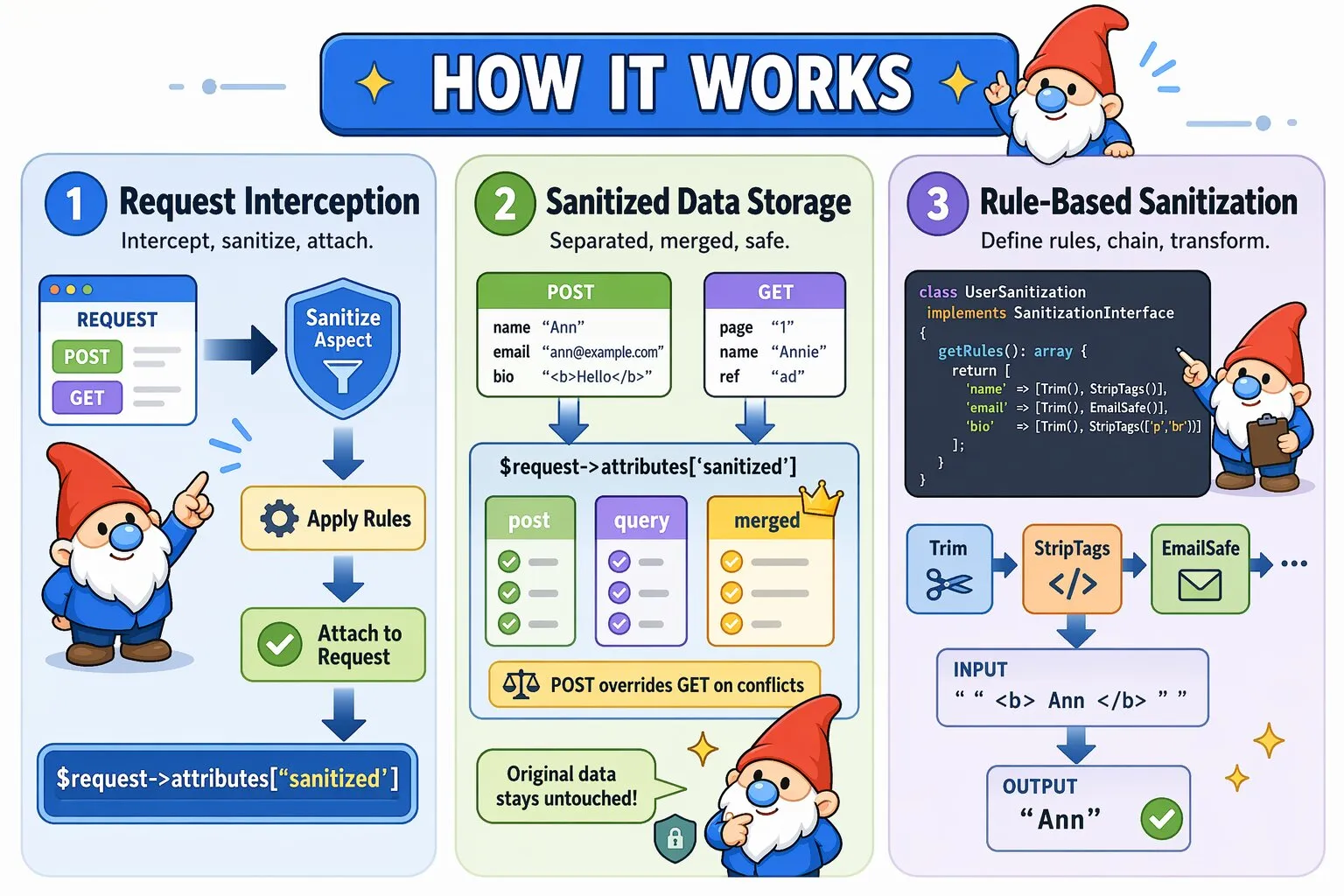
How SanitizeAspect Works
When a request hits a route with @InterceptWith(SanitizeAspect::class):
- The aspect instantiates your sanitization class
- Retrieves sanitization rules by calling
getRules() - Sanitizes POST and GET data independently
- Builds a deterministic merged sanitized view
- Stores sanitized data in
$request->attributes['sanitized'] - Continues to your controller with the modified request
Important: Sanitization does not overwrite $request->request or $request->query. The original input remains unchanged for debugging and traceability. Sanitized values are available in a dedicated attribute structure.
The stored structure looks like:
sanitized:
  post   → sanitized POST data
  query  → sanitized GET data
  merged → combined sanitized view (POST overrides GET on conflicts)
Basic Usage
Apply sanitization using the @InterceptWith annotation:
<?php
namespace App\Controllers;

use Quellabs\Canvas\Annotations\Route;
use Quellabs\Canvas\Annotations\InterceptWith;
use Quellabs\Canvas\Sanitization\SanitizeAspect;
use App\Sanitization\UserSanitization;
use Symfony\Component\HttpFoundation\Request;

class UserController extends BaseController {

    /**
     * @Route("/users/create", methods={"POST"})
     * @InterceptWith(SanitizeAspect::class, sanitizer=UserSanitization::class)
     */
    public function create(Request $request) {
        // Retrieve sanitized data
        $sanitized = $request->attributes->get('sanitized', []);
        $input = $sanitized['merged'] ?? [];

        $user = new User();
        $user->setName($input['name'] ?? null);
        $user->setEmail($input['email'] ?? null);
        $user->setBio($input['bio'] ?? null);

        $this->em()->persist($user);
        $this->em()->flush();

        return $this->redirect('/users');
    }
}
You may also access sanitized sources explicitly:
$post  = $sanitized['post'];
$query = $sanitized['query'];
Access Patterns
Sanitized data is intentionally separated from raw input to avoid accidental mutation and to make intent explicit.
- Use
mergedwhen your controller treats input as a single payload - Use
postorquerywhen source distinction matters
The merged view applies deterministic precedence — POST values override GET values when keys collide.
Creating Sanitization Classes
Define transformation rules by implementing SanitizationInterface:
<?php
namespace App\Sanitization;

use Quellabs\Canvas\Sanitization\Contracts\SanitizationInterface;
use Quellabs\Canvas\Sanitization\Rules\Trim;
use Quellabs\Canvas\Sanitization\Rules\EmailSafe;
use Quellabs\Canvas\Sanitization\Rules\StripTags;
use Quellabs\Canvas\Sanitization\Rules\UrlSafe;

class UserSanitization implements SanitizationInterface {

    public function getRules(): array {
        return [
            'name' => [new Trim(), new StripTags()],
            'email' => [new Trim(), new EmailSafe()],
            'website' => [new Trim(), new UrlSafe()],

            // StripTags accepts array of allowed tag names (without angle brackets)
            'bio' => [new Trim(), new StripTags(['p', 'br', 'strong', 'em'])]
        ];
    }
}
Built-in Sanitization Rules
Text Cleaning
Trim- Remove leading/trailing whitespaceStripTags(array $allowed = [])- Remove HTML tags, optionally allow specific tag names like['p', 'br', 'strong']RemoveControlChars- Remove ASCII control characters (0x00-0x1F except tab/newline)RemoveZeroWidth- Remove invisible Unicode characters (zero-width spaces, joiners, etc.)NormalizeLineEndings- Convert all line endings to \nRemoveStyleAttributes- Strip inline style attributes from HTML
Security Transformations
ScriptSafe- Remove script tags, event handlers, and javascript: URLsSqlSafe- Remove common SQL metacharacters (not a substitute for parameterized queries)RemoveNullBytes- Remove null bytes that can bypass security checks
Format Normalization
EmailSafe- Keep only valid email characters (letters, digits, @, ., -, +, _)UrlSafe- Keep only valid URL charactersPathSafe- Remove directory traversal sequences (../, ..\, etc.)
Rule Chaining and Execution Order
Multiple rules execute left-to-right, with each rule receiving the output of the previous rule:
'description' => [
    new Trim(),                                    // 1. "  <p>Hello</p>  " → "<p>Hello</p>"
    new StripTags(['p', 'br', 'strong']),        // 2. "<p>Hello</p>" → "<p>Hello</p>"
    new RemoveStyleAttributes(),                   // 3. Removes any style="" attributes
    new NormalizeLineEndings()                    // 4. Converts \r\n to \n
]

// Input:  "  <p style='color:red'>Hello</p>\r\n  "
// Output: "<p>Hello</p>\n"
Creating Custom Sanitization Rules
Implement SanitizationRuleInterface to create custom transformations:
<?php
namespace App\Sanitization\Rules;

use Quellabs\Canvas\Sanitization\Contracts\SanitizationRuleInterface;

class CleanPhoneNumber implements SanitizationRuleInterface {

    public function sanitize(mixed $value): mixed {
        // Return non-strings unchanged
        if (!is_string($value)) {
            return $value;
        }

        // Remove all non-digit characters except leading +
        $cleaned = preg_replace('/[^0-9+]/', '', $value);

        // Ensure only one + at the start
        return str_starts_with($cleaned, '+')
            ? '+' . str_replace('+', '', $cleaned)
            : $cleaned;
    }
}

// Usage
'phone' => [new Trim(), new CleanPhoneNumber()]

// Input:  "  +1 (555) 123-4567  "
// Output: "+15551234567"
Security Considerations
Defense in Depth
Sanitization is one layer of security, not the complete solution:
- Input Sanitization - Clean and normalize data (this feature)
- Input Validation - Verify data meets business requirements
- Parameterized Queries - Prevent SQL injection (sanitization alone is insufficient)
- Output Escaping - Escape data when rendering in templates
- CSP Headers - Browser-level XSS protection
Best Practices
- Sanitize early: Sanitized data is available before controller logic while original input remains preserved
- Be explicit: List all fields that need sanitization - unlisted fields pass through unchanged
- Order matters: Place
Trimfirst, format-specific rules last - Test edge cases: Verify behavior with empty strings, null values, and malformed input
- Don't trust sanitization alone: Use parameterized queries, output escaping, and validation
- Document allowed tags: When using
StripTagswith an allowlist, document why those tags are safe