 Canvas
Templating
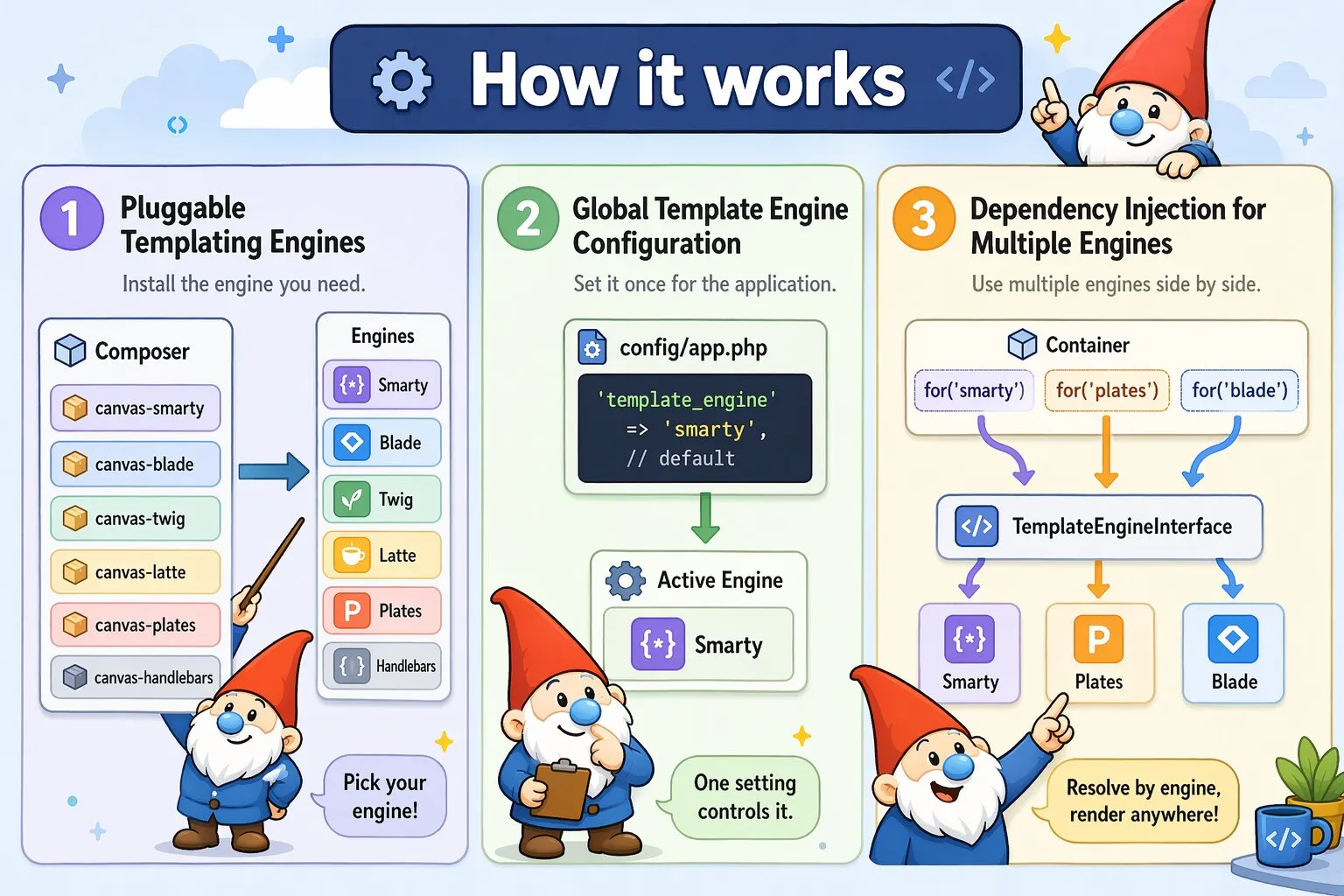
Canvas supports multiple templating engines through optional packages. Smarty is installed by default, but you can switch to Blade, Twig, Latte, or Plates depending on your preference — or use multiple engines side by side within the same application.
Installation
Each templating engine is available as a separate Composer package. After installing, run the engine's init command to generate the config file:
composer require quellabs/canvas-smarty
php vendor/bin/sculpt smarty:init
Replace smarty with the identifier of the engine you are installing. The identifier is also the string that activates it as the default in config/app.php:
| Identifier | Package | Engine |
|---|---|---|
smarty | quellabs/canvas-smarty | Smarty (default, installed with Canvas) |
blade | quellabs/canvas-blade | Laravel Blade syntax |
twig | quellabs/canvas-twig | Twig by Symfony |
latte | quellabs/canvas-latte | Latte by Nette |
plates | quellabs/canvas-plates | Plates (native PHP templates) |
handlebars | quellabs/canvas-handlebars | Handlebars (compiled native PHP templates) |
Basic Usage
Call $this->render() from any controller that extends BaseController, passing the template path and an array of variables:
class UserController extends BaseController {

    /**
     * @Route("/users")
     */
    public function index(): Response {
        $users = $this->em()->findBy(UserEntity::class, ['active' => true]);
        return $this->render('users/index.tpl', ['users' => $users]);
    }
}
Template paths are relative to the template_dir defined in the engine's config file (see Engine-Specific Configuration below). The default is the templates/ directory in your project root.
{* templates/users/index.tpl *}
{foreach $users as $user}
    <p>{$user->getName()}</p>
{/foreach}
Template inheritance, layouts, and partials are handled entirely by the engine itself — refer to the engine's own documentation for those features.
Configuration
Set the active templating engine in config/app.php using the template_engine key. The value must match the package name of the installed engine:
// Template engine
'template_engine' => 'smarty',  // default
Engine-Specific Configuration
Each templating engine can be configured individually through its own config file in the config/ directory. Run the engine's init command to generate it:
php vendor/bin/sculpt smarty:init
php vendor/bin/sculpt blade:init
php vendor/bin/sculpt twig:init
php vendor/bin/sculpt latte:init
php vendor/bin/sculpt plates:init
php vendor/bin/sculpt handlebars:init
This creates the config file for the corresponding engine:
config/smarty.phpconfig/blade.phpconfig/twig.phpconfig/latte.phpconfig/plates.phpconfig/handlebars.php
Use these files to configure engine-specific options such as the template directory, caching, debug mode, and extensions.
Rendering via the Container
$this->render() is a convenience wrapper around the DI-resolved engine. Resolving the engine directly from the container is equivalent and produces the same result:
// Via BaseController shorthand
return $this->render('users/index.tpl', ['users' => $users]);

// Via container directly — identical result
$engine = $this->container->get(TemplateEngineInterface::class);
return new Response($engine->render('users/index.tpl', ['users' => $users]));
The container approach is useful in service classes or other contexts where BaseController is not available.
Injecting an Engine into a Route Method
A specific engine can be injected directly into a route method using @WithContext. This is useful when a single route needs a different engine than the application default:
/**
 * @Route("/users")
 * @WithContext(parameter="engine", context="blade")
 */
public function index(TemplateEngineInterface $engine): Response {
    $users = $this->em()->findBy(UserEntity::class, ['active' => true]);
    return new Response($engine->render('users/index.blade.php', ['users' => $users]));
}
Without @WithContext, the default engine is injected automatically. Use @WithContext only when you need a specific engine other than the default — the context value must match one of the engine identifiers listed above. See Contextual Containers for full details on @WithContext.
Mixing Engines via Dependency Injection
Canvas allows you to use multiple templating engines within the same application. Resolve a specific engine from the container using the for() method with the engine identifier:
$template = $container->for('smarty')->get(TemplateEngineInterface::class);
$template = $container->for('plates')->get(TemplateEngineInterface::class);
$template = $container->for('blade')->get(TemplateEngineInterface::class);
This is useful when migrating between engines incrementally, or when different parts of your application have different templating needs. Each resolved instance is fully configured and ready to render.
Engine Documentation
For template syntax, layouts, inheritance, and engine-specific features, refer to each engine's own documentation: