 Canvas
Rate Limiting
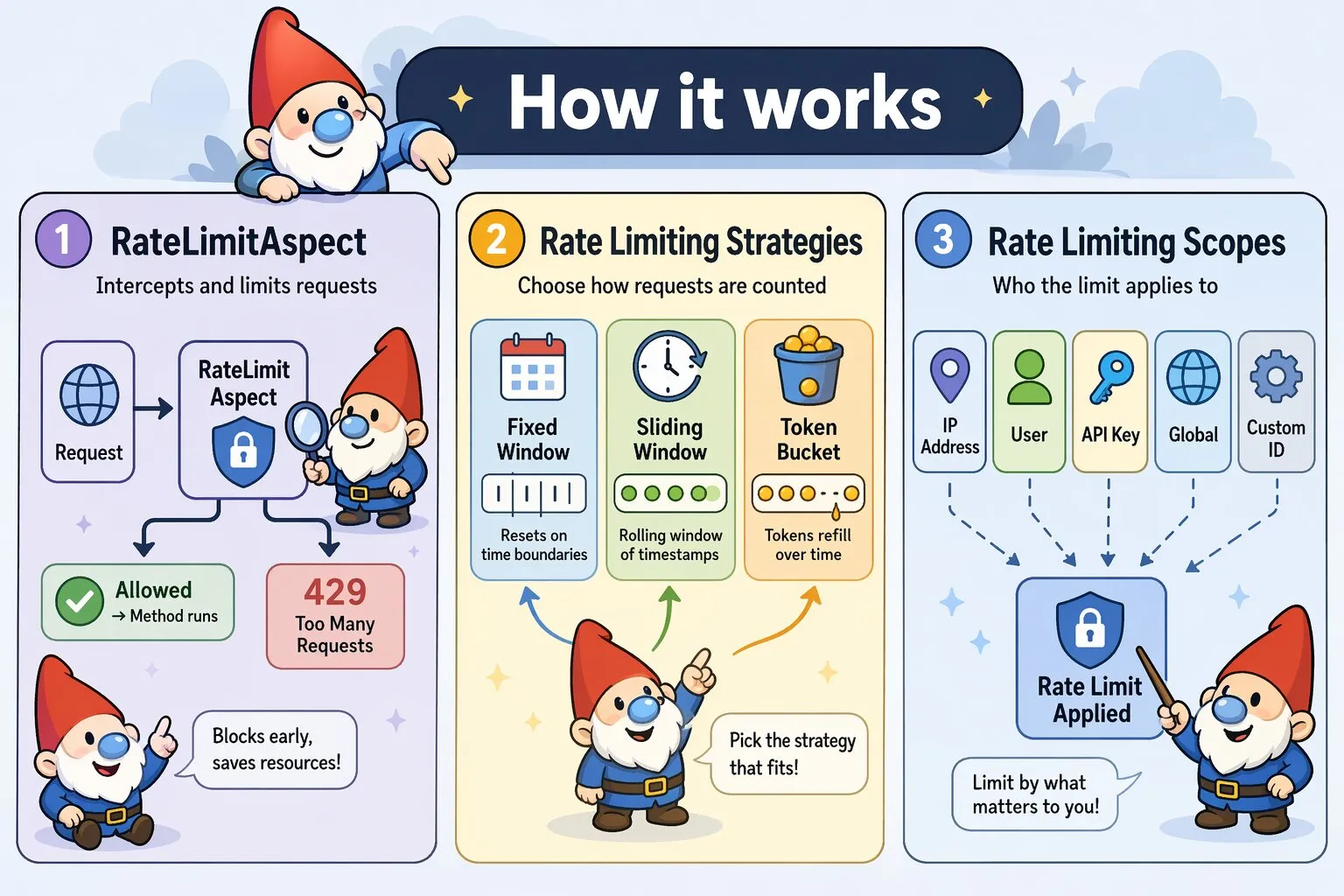
Protect your Canvas applications from abuse and ensure fair resource allocation using flexible, strategy-based rate limiting with the RateLimitAspect.
Quick Start
Add rate limiting to any controller method with a single annotation. When the limit is exceeded, the outcome depends on your chosen failure mode: by default, the result is written to request attributes and your controller still executes; with throwOnFailure=true, a RateLimitException is thrown before your method runs.
class ApiController extends BaseController {

    /**
     * @Route("/api/data")
     * @InterceptWith(RateLimitAspect::class, limit=60, window=3600)
     */
    public function getData() {
        // Limited to 60 requests per hour by IP address
        return $this->json(['data' => $this->fetchData()]);
    }
}
Rate Limiting Strategies
RateLimitAspect supports three distinct strategies, each with different characteristics:
Fixed Window (Default)
Divides time into fixed intervals and counts requests within each window. Simple and memory-efficient, but allows burst traffic at window boundaries. Fixed window is ideal when memory efficiency is critical, approximate rate limiting is acceptable, you have many endpoints to protect, or traffic patterns are relatively smooth.
/**
 * @Route("/api/public")
 * @InterceptWith(RateLimitAspect::class,
 *     limit=100,
 *     window=3600,
 *     strategy="fixed_window"
 * )
 */
public function publicEndpoint() {
    // Resets every hour on the hour
    // Window boundaries: 00:00, 01:00, 02:00, etc.
}| Pros | Cons |
|---|---|
|
|
Sliding Window
Maintains a rolling window of request timestamps. Provides accurate rate limiting without boundary burst issues. Sliding window is ideal when accurate rate limiting is required, preventing boundary bursts is important, fair distribution matters (such as for SLAs or billing), or you can afford higher memory usage.
/**
 * @Route("/api/premium")
 * @InterceptWith(RateLimitAspect::class,
 *     limit=1000,
 *     window=3600,
 *     strategy="sliding_window"
 * )
 */
public function premiumEndpoint() {
    // Tracks last 1000 requests over rolling 60-minute window
    // No burst traffic possible
}| Pros | Cons |
|---|---|
|
|
Token Bucket
Maintains a bucket of tokens that refill at a constant rate. Allows controlled bursts while maintaining long-term rate limits. Token bucket is ideal when legitimate burst traffic is expected, you want smooth long-term rate limiting, traffic patterns are bursty by nature, or user experience during bursts matters.
/**
 * @Route("/api/upload")
 * @InterceptWith(RateLimitAspect::class,
 *     limit=10,
 *     window=60,
 *     strategy="token_bucket"
 * )
 */
public function upload() {
    // Allows bursts up to 10 requests
    // Refills at 0.167 tokens/second (10 per 60 seconds)
    // Smooth handling of bursty traffic patterns
}| Pros | Cons |
|---|---|
|
|
Failure Modes
When the rate limit is exceeded, RateLimitAspect always writes the result to request attributes first. What happens next depends on whether throwOnFailure is enabled.
Default Behavior
Your controller always executes. Check rate_limit_exceeded in your controller and decide how to respond:
/**
 * @Route("/api/data")
 * @InterceptWith(RateLimitAspect::class, limit=60, window=3600)
 */
public function getData(Request $request) {
    if ($request->attributes->get('rate_limit_exceeded')) {
        $result = $request->attributes->get('rate_limit_result');

        return $this->json([
            'error'       => 'Rate limit exceeded',
            'retry_after' => $result['retry_after'],
        ], 429);
    }

    return $this->json(['data' => $this->fetchData()]);
}
The following request attributes are always set when the aspect runs:
rate_limit_exceeded(bool) —trueif the limit was exceededrate_limit_result(array) — full result from the chosen strategy, includingcount,exceeded,reset_time, andretry_afterrate_limit_strategy(string) — the active strategy namerate_limit_headers(array) — the prepared response headers, applied to the outgoing response automatically by theafter()hook
Exception Mode
Use throwOnFailure=true to throw a RateLimitException when the limit is exceeded. Your controller method never executes — Canvas's exception handler takes over:
/**
 * @Route("/api/data")
 * @InterceptWith(RateLimitAspect::class, limit=60, window=3600, throwOnFailure=true)
 */
public function getData() {
    // Only reached when the rate limit has not been exceeded
    return $this->json(['data' => $this->fetchData()]);
}
The thrown RateLimitException carries the full rate limit context so your exception handler can construct an accurate response:
use Quellabs\Canvas\Exceptions\RateLimitException;

// In your exception handler:
if ($e instanceof RateLimitException) {
    $limit       = $e->getLimit();        // Configured request limit
    $remaining   = $e->getRemaining();    // Requests remaining (always 0 when thrown)
    $retryAfter  = $e->getRetryAfter();   // Seconds until the client may retry
    $resetTime   = $e->getResetTime();    // Unix timestamp when the window resets
    $strategy    = $e->getStrategy();     // Active strategy name
    $scope       = $e->getScope();        // Active scope name
    $headers     = $e->getHeaders();      // Prepared X-RateLimit-* headers array
}
When to use exception mode:
- API endpoints where clients handle HTTP error codes programmatically
- When you have a central exception handler that already formats error responses consistently
- Situations where you want to guarantee the controller never runs when the limit is exceeded
Default Configuration
RateLimitAspect comes with sensible defaults. When you use it without parameters, you get:
/**
 * @InterceptWith(RateLimitAspect::class)
 */
public function endpoint() {
    // Defaults:
    // - limit: 60 requests
    // - window: 3600 seconds (1 hour)
    // - strategy: 'fixed_window'
    // - scope: 'ip'
    // - exemptMethods: ['GET', 'HEAD', 'OPTIONS']
    // - headerPrefix: 'X-RateLimit'
    // - throwOnFailure: false
}
All parameters can be customized via annotation attributes:
| Parameter | Default | Description |
|---|---|---|
limit |
60 |
Number of requests allowed per window |
window |
3600 |
Time window in seconds |
strategy |
'fixed_window' |
Rate limiting strategy: 'fixed_window', 'sliding_window', or 'token_bucket' |
scope |
'ip' |
Rate limit scope: 'ip', 'user', 'api_key', 'global', or 'custom' |
identifier |
'' |
Custom identifier (required when scope is 'custom') |
exemptMethods |
['GET', 'HEAD', 'OPTIONS'] |
HTTP methods exempt from rate limiting |
headerPrefix |
'X-RateLimit' |
Prefix for rate limit response headers |
throwOnFailure |
false |
Throw a RateLimitException when the limit is exceeded instead of writing the result to request attributes and continuing to the controller |
Rate Limiting Scopes
Control the granularity of rate limiting by choosing different scopes:
IP-Based (Default)
Rate limit by client IP address:
/**
 * @Route("/login")
 * @InterceptWith(RateLimitAspect::class,
 *     limit=5,
 *     window=300,
 *     scope="ip"
 * )
 */
public function login() {
    // Each IP address gets 5 login attempts per 5 minutes
}
User-Based
Rate limit authenticated users individually. By default, RateLimitAspect looks for user_id in the session:
/**
 * @Route("/api/user-data")
 * @InterceptWith(RequireAuthAspect::class)
 * @InterceptWith(RateLimitAspect::class,
 *     limit=1000,
 *     window=3600,
 *     scope="user"
 * )
 */
public function getUserData() {
    // Each authenticated user gets 1000 requests/hour
    // Reads $_SESSION['user_id'] by default
    // Falls back to IP if not authenticated
}
Custom User Identification
If your authentication system uses a different approach, extend RateLimitAspect and override getUserIdentifier():
class MyRateLimitAspect extends RateLimitAspect {
    protected function getUserIdentifier($request): string {
        // Example: JWT token in header
        if ($token = $request->headers->get('Authorization')) {
            $payload = $this->decodeJWT($token);
            return 'user_' . $payload['user_id'];
        }

        // Example: Custom request attribute (set by auth middleware)
        if ($userId = $request->attributes->get('authenticated_user_id')) {
            return 'user_' . $userId;
        }

        // Fallback to IP for unauthenticated requests
        return 'anonymous_' . $request->getClientIp();
    }
}
Then use your extended aspect in annotations:
/**
 * @Route("/api/user-data")
 * @InterceptWith(MyRateLimitAspect::class,
 *     limit=1000,
 *     window=3600,
 *     scope="user"
 * )
 */
public function getUserData() {
    // Uses your custom user identification logic
}
API Key
Rate limit by API key for partner integrations:
/**
 * @Route("/api/partner/data")
 * @InterceptWith(RateLimitAspect::class,
 *     limit=10000,
 *     window=86400,
 *     scope="api_key"
 * )
 */
public function partnerData() {
    // Each API key gets 10,000 requests per day
    // Reads from X-API-Key header
}
Global
Rate limit across all clients (useful for expensive operations):
/**
 * @Route("/api/heavy-operation")
 * @InterceptWith(RateLimitAspect::class,
 *     limit=100,
 *     window=60,
 *     scope="global"
 * )
 */
public function heavyOperation() {
    // Only 100 requests total per minute across all clients
    // Protects backend resources
}
Custom
Rate limit by any custom identifier:
/**
 * @Route("/api/organization/{orgId}/data")
 * @InterceptWith(RateLimitAspect::class,
 *     limit=5000,
 *     window=3600,
 *     scope="custom",
 *     identifier="org_123"
 * )
 */
public function organizationData(int $orgId) {
    // Rate limit per organization
    // Useful for multi-tenant applications
}
HTTP Method Exemptions
By default, read-only methods (GET, HEAD, OPTIONS) are exempt from rate limiting. Customize this behavior:
/**
 * @Route("/api/data")
 * @InterceptWith(RateLimitAspect::class,
 *     limit=100,
 *     window=3600,
 *     exemptMethods={"OPTIONS"}
 * )
 */
public function data() {
    // Only OPTIONS is exempt
    // GET, POST, PUT, DELETE all count toward limit
}
Remove all exemptions to rate limit every request:
/**
 * @InterceptWith(RateLimitAspect::class,
 *     limit=1000,
 *     window=3600,
 *     exemptMethods={}
 * )
 */
public function strictEndpoint() {
    // All HTTP methods are rate limited
}
Rate Limit Headers
RateLimitAspect adds informative headers to every response via its after() hook, regardless of whether the limit was exceeded:
X-RateLimit-Limit: 100
X-RateLimit-Remaining: 0
X-RateLimit-Reset: 1703692800
Retry-After: 247
Retry-After is only included when the limit has been exceeded. Customize the header prefix:
/**
 * @InterceptWith(RateLimitAspect::class,
 *     limit=100,
 *     window=3600,
 *     headerPrefix="X-API-Limit"
 * )
 */
public function customHeaders() {
    // Headers: X-API-Limit-Limit, X-API-Limit-Remaining, X-API-Limit-Reset
}
When throwOnFailure=true is set and the limit is exceeded, the after() hook does not run because the controller never executes. The prepared headers array is available on the RateLimitException via getHeaders() so your exception handler can apply them to the error response.