 Canvas
Loom (Page Builder)
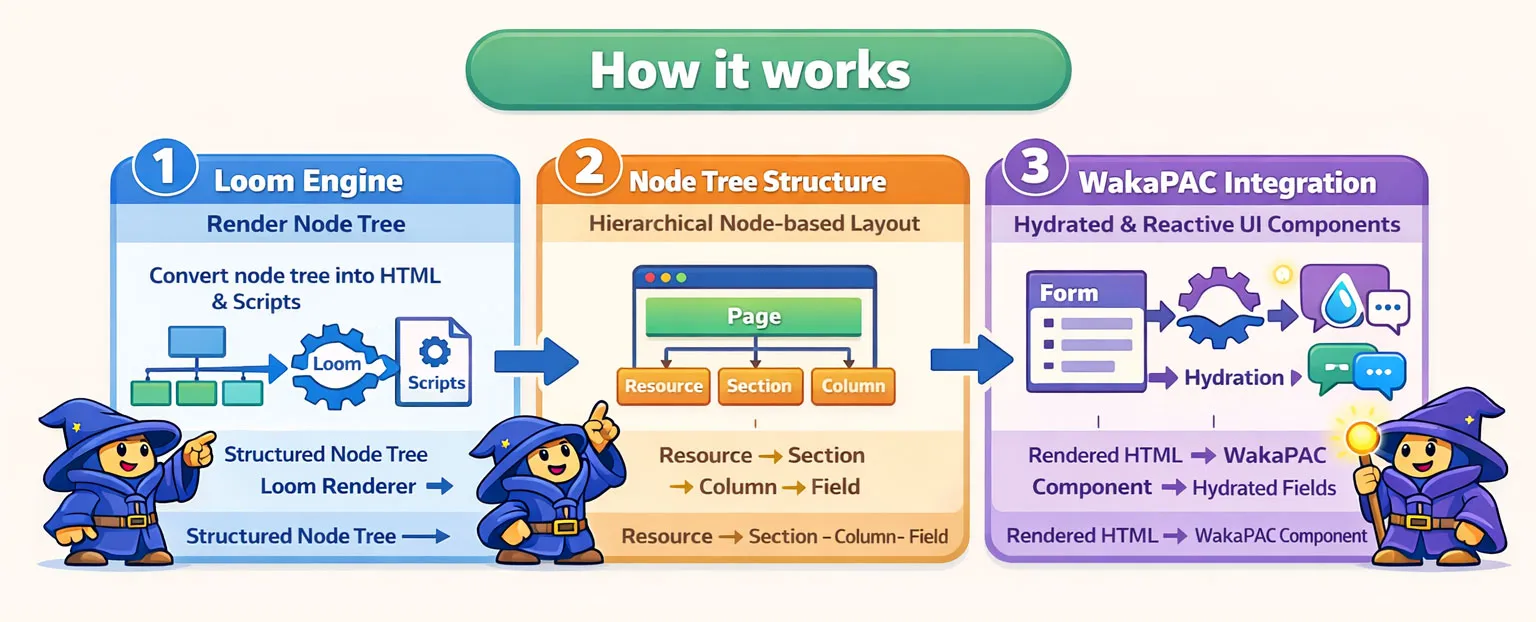
Loom is a definition-driven page builder for Canvas that turns structured PHP definitions into interactive, data-bound admin pages such as forms, settings panels, and editors. Define your page structure using the fluent builder API, pass your data, and Loom handles rendering, field binding, and WakaPAC initialisation. WakaPAC is the client-side runtime used by Canvas for reactive components and message-based interaction between UI elements.
Core Concepts
Loom is built around a small set of primitives that work together to turn a PHP definition into a rendered page. Understanding these makes it easier to extend or customise any part of the pipeline.
- Engine — The
Loomclass that recursively renders a node tree into HTML and collects WakaPAC initialisation scripts. - Node — A single element in the tree, defined by a type, properties, and optional children.
- Renderer — A PHP class responsible for turning a node into HTML. One renderer per node type.
- Builder — A fluent PHP API for constructing node trees without writing JSON by hand. Builders expose static
make()or helper methods that create nodes and allow properties to be configured fluently. Callingbuild()on the root node returns the final definition passed to the Loom engine. - Data binding — Entity data passed to
render()is automatically distributed to field values via DOM hydration.
Node Types
| Node | Purpose |
|---|---|
Resource | Page root — renders a form with header, title, and save/cancel buttons |
Section | Visual grouping — adds a subtle border and background around related fields |
Tabs | Layout container with tab navigation |
Panel | Layout container for grouping fields |
Columns / Column | Flex layout with percentage-based widths |
Field | Input element with label, validation, and data binding |
Text | Read-only label/value pair, supports WakaPAC interpolation |
Button | Action trigger bound to WakaPAC expressions |
Installation
Install via Composer:
composer require quellabs/canvas-loomThen copy the Loom stylesheet to your public folder:
php ./vendor/bin/sculpt loom:install-cssJavaScript Dependencies
WakaPAC is only needed when the page uses reactive features. Loom automatically detects this and only emits a WakaPAC initialisation script when the definition contains at least one of the following:
- A field with a
data-pac-bindexpression - A
Textnode with{{ }}interpolation - A
Buttonwith an action expression - Dependent dropdowns (
->dependsOn()) - Client-side validation (
->useWakaForm()) - Custom scripts or abstraction properties (
->script(),->abstraction())
When reactive features are present, include WakaPAC before the closing </body> tag:
<script src="https://cdn.jsdelivr.net/gh/quellabs/wakapac@main/wakapac.min.js"></script>If you use ->useWakaForm() for client-side validation, also include WakaForm and register it as a WakaPAC plugin:
<script src="https://cdn.jsdelivr.net/gh/quellabs/wakapac@main/plugins/wakaform.min.js"></script>
<script>
    wakaPAC.use(wakaForm);
</script>wakaPAC.use(wakaForm) call before Loom's output, or at minimum before the closing </body> tag in the correct order.
If you use Field::richtext(), also include the corresponding editor plugin and register it:
<script src="/wakajodit.js"></script>
<script>
    wakaPAC.use(WakaJodit);
</script>
If you use Field::file() for async file uploads, also include WakaSync:
<script src="/wakasync.js"></script>Quick Start
Define a page, pass entity data, and render:
use Quellabs\Canvas\Loom\Loom;
use Quellabs\Canvas\Loom\Builder\Resource;
use Quellabs\Canvas\Loom\Builder\Section;
use Quellabs\Canvas\Loom\Builder\Field;

$definition = Resource::make('post-form', '/admin/posts/save')
    ->title('Edit Post')
    ->add(Section::make()
        ->add(Field::text('title', 'Title')->required())
        ->add(Field::textarea('body', 'Content')->rows(10))
    )
    ->build();

$loom = new Loom();
echo $loom->render($definition, [
    'title' => 'My First Post',
    'body'  => 'Hello world.',
]);
Resource
A resource is the root node of every Loom page. It renders a <form> element with a header containing a title, cancel button, and save button. The form is automatically initialised as a WakaPAC component with DOM hydration enabled.
Resource::make('post-form', '/admin/posts/save')
    ->title('Edit Post')
    ->method('POST')
    ->saveLabel('Publish')
    ->add(...)
    ->build();
The header can be rendered separately from the form body — useful when your layout places the header outside the form:
// Header only
echo $loom->render($definition, $data, ['part' => 'header']);

// Body only
echo $loom->render($definition, $data, ['part' => 'body']);
Header Buttons
Extra buttons can be added to the header. They are hidden by default and shown or hidden by sending a WakaPAC message to the header component ({id}-header):
Resource::make('post-form', '/admin/posts/save')
    ->title('Edit Post')
    ->abstraction([
        '_MSG_SHOW_DELETE' => 1001,
        '_MSG_HIDE_DELETE' => 1002,
    ])
    ->addHeaderButton(
        Button::make('Delete')
            ->danger()
            ->name('delete')
            ->showMessage(1001)
            ->hideMessage(1002)
            ->action("Stdlib.sendMessage('post-form-header', _MSG_SHOW_DELETE, 0, 0)")
    );
// Show the delete button
wakaPAC.sendMessage('post-form-header', 1001, 0, 0);
// Hide the delete button
wakaPAC.sendMessage('post-form-header', 1002, 0, 0);Abstraction
Resource can expose custom properties on its abstraction object using ->abstraction(). Values must be scalars or arrays and are serialised to JSON. The primary use case is named message constants, which must be present on the abstraction to be accessible inside data-pac-bind expressions.
Properties with an underscore prefix are treated as non-reactive by WakaPAC — they are readable in bind expressions but do not trigger re-renders when accessed:
Resource::make('post-form', '/admin/posts/save')
    ->abstraction([
        '_MSG_SHOW_DELETE' => 1001,
        '_MSG_HIDE_DELETE' => 1002,
    ]);
Loom merges these into the generated wakaPAC() call alongside the built-in submit(), post(), and dismiss() methods:
wakaPAC('post-form', {
    _MSG_SHOW_DELETE: 1001,
    _MSG_HIDE_DELETE: 1002,
    submit() { ... },
    post(url) { ... },
    dismiss() { ... }
}, { hydrate: true });
Script
Resource can be extended with raw JavaScript using ->script(). The snippet is placed directly inside the abstraction object literal, so it must be valid in that context: method definitions, computed properties, arrow function properties, and so on.
The primary use case is setting bind values programmatically — something that can only be done by calling a WakaPAC method rather than passing a static value through the data array.
Resource::make('post-form', '/admin/posts/save')
    ->script("
        resetForm() {
            this.title = '';
            this.body  = '';
        },
        computed: {
            charCount() {
                return this.body ? this.body.length : 0;
            }
        }
    ")
    ->add(...)
    ->build();
The generated output lands alongside the built-in methods inside the wakaPAC() call:
wakaPAC('post-form', {
    resetForm() {
        this.title = '';
        this.body  = '';
    },
    computed: {
        charCount() {
            return this.body ? this.body.length : 0;
        }
    },
    submit() { ... },
    post(url) { ... },
    dismiss() { ... }
}, { hydrate: true });->script().
->script() and ->abstraction() serve different purposes. Use abstraction() for scalar and array values — named constants, configuration, initial state. Use script() when you need methods, computed properties, or any logic that cannot be expressed as a serialised value.
Sections, Panels & Tabs
Loom provides four container types that group fields: Section for visual grouping, Panel for structural grouping, Tabs for tabbed navigation, and a sidebar layout variant built on Column.
Section
A section groups related fields together with a subtle border and background. It carries no WakaPAC initialisation — field reactivity is handled by the parent container.
Section::make('post-details')
    ->add(Field::text('title', 'Title'))
    ->add(Field::textarea('body', 'Content'));
Panel
A panel is a structural grouping container. It renders a <div> wrapper around its children.
Panel::make('post-panel')
    ->add(Section::make()
        ->add(Field::text('title', 'Title'))
    );
Sidebar
A column can be marked as a sidebar, rendering a title and hint text separated from the content by a vertical line. This is set on the column itself, not as a separate node type:
Columns::make([25, 75])
    ->add(Column::make()
        ->markAsSidebar('Post Details', 'Fill in the basic information about your post.')
    )
    ->add(Column::make()
        ->add(Field::text('title', 'Title'))
        ->add(Field::textarea('body', 'Content'))
    );
Tabs
Tabs renders a tabbed interface. Tab switching is handled client-side without a page reload. The initially active tab is set via the second argument of Tabs::make().
Tabs::make('post-tabs', 'general')
    ->add(Tab::make('general', 'General')
        ->add(Section::make()
            ->add(Field::text('title', 'Title'))
        )
    )
    ->add(Tab::make('seo', 'SEO')
        ->add(Section::make()
            ->add(Field::text('meta_title', 'Meta title'))
        )
);Tabs::make() — the tab bar is built from these definitions, not inferred from child nodes. This keeps tab order explicit and avoids scanning the node tree during rendering. Each Tab::make() id must match an entry in the tabs definition.
Tab Error Indicators
When a form uses ->useWakaForm() and the user attempts to submit with validation errors, tab buttons that contain at least one invalid field are automatically marked with a red indicator dot. This gives users an immediate signal that errors exist on tabs they haven't visited.
Error indicators are updated in two scenarios:
- Server-side validation — when the form is re-rendered with
_errors, the indicator is stamped directly on the tab button at render time. No JavaScript required. - Client-side validation (WakaForm) — after a failed submit attempt,
validateAndSubmit()checks each field's validity and toggles the indicator class on the corresponding tab button.
No additional configuration is required — the feature is active whenever Tabs and ->useWakaForm() are used together.
Layout
Loom provides a flex-based column layout for arranging fields side by side. Widths are declared on the parent and columns fill the remaining space proportionally.
Columns
Columns creates a flex layout. Widths are defined as percentages on the parent — columns without a corresponding width entry expand to fill the remaining space.
Columns::make([70, 30])
    ->add(Column::make()
        ->add(Field::text('title', 'Title'))
    )
    ->add(Column::make()
        ->add(Field::select('status', 'Status'))
    );
An optional gap between columns can be set:
Columns::make([70, 30], '2rem');Fields
Fields are the basic input elements of a Loom page. Each field renders a label, an input element, and an optional hint. Field values are populated automatically from the data array passed to render().
Input Types
Field::text('title', 'Title')
Field::textarea('body', 'Content')
Field::select('status', 'Status')
Field::checkbox('featured', 'Featured post')
Field::radio('theme', 'Theme')
Field::number('priority', 'Priority')
Field::toggle('is_active', 'Active')
Field::hidden('post_id')
Field::email('email', 'Email address')
Field::tel('phone', 'Phone number')
Field::url('website', 'Website')
Field::range('volume', 'Volume')
Field::date('published_at', 'Publish date')
Field::datetimeLocal('scheduled_at', 'Scheduled at')
Field::time('start_time', 'Start time')
Field::week('week', 'Week')
Field::month('month', 'Month')
Field::richtext('body', 'Content')
Field::file('attachments', 'Attachments', '/upload')
Toggle
A toggle renders as an on/off switch. The WakaPAC bind expression uses checked:, mapping the value as a boolean rather than a string. The initial state is read from the data array passed to render() — a truthy value renders the toggle on, a falsy value or absent key renders it off. The disabled() modifier is supported.
Field::toggle('is_active', 'Active')
Field::toggle('is_active', 'Active')->disabled()
echo $loom->render($definition, [
'is_active' => true,
]);Hidden
A hidden field renders a bare <input type="hidden"> with no label, no wrapper div, and no WakaPAC binding. Use it to pass IDs or flags alongside a form without exposing them in the UI. The value is populated from the data array.
Field::hidden('post_id')echo $loom->render($definition, [
'post_id' => 42,
]);Rich Text
A richtext field renders a WYSIWYG editor powered by a WakaPAC editor plugin. Loom supports Jodit, TinyMCE, CKEditor 4, and CKEditor 5. The editor is specified as the third argument — defaults to jodit.
Field::richtext('body', 'Content')                      // Jodit (default)
Field::richtext('body', 'Content', 'tinymce')
Field::richtext('body', 'Content', 'ckeditor4')
Field::richtext('body', 'Content', 'ckeditor5')
The field renders as a <waka-jodit>, <waka-tinymce>, or <waka-ckeditor> custom element with its own data-pac-id. The editor plugin manages value syncing to an internal proxy textarea that participates in form submission automatically.
The corresponding editor plugin must be included on the page and registered as a WakaPAC plugin:
<script src="/wakajodit.js"></script>
<script>
    wakaPAC.use(WakaJodit);
</script>->hint() modifier is supported but length-based hints such as {{ body.length }} characters typed will reflect the raw HTML length, not the plain text length. Use the editor's built-in character counter instead.
File Upload
A file field renders an async upload widget. Files are uploaded immediately on selection via WakaSync — no page reload required. Successfully uploaded files are submitted with the form as an array of server-assigned IDs.
// Single file
Field::file('avatar', 'Avatar', '/upload')

// Multiple files
Field::file('attachments', 'Attachments', '/upload', multiple: true)
The third argument is the upload endpoint URL. The endpoint must accept a multipart/form-data POST with a file field and return JSON:
// Success (2xx)
{ "id": "abc123", "name": "photo.webp", "size": 204800 }

// Failure (non-2xx) — error message is optional
{ "error": "File type not allowed" }
On success, a hidden input is injected as name[] with the returned id as its value, so submitted data contains an array of IDs. On failure, the file is shown in an error state with the server message (or a generic fallback). The user can dismiss failed uploads from the list.
WakaSync must be included on the page:
<script src="/wakasync.js"></script>The widget renders a bordered panel with the file count on the left and an "Add file(s)" button on the right. Each uploaded file appears as a row showing the filename and size. Rows are colour-coded by status: blue while uploading, green on success, red on error.
Validation Attributes
Field::text('title', 'Title')
    ->required()
    ->maxlength(200)
    ->placeholder('Enter a title')

Field::number('priority', 'Priority')
    ->min(1)
    ->max(10)
    ->step(1)

Field::text('slug', 'Slug')
    ->pattern('[a-z0-9-]+')
    ->readonly()
Hint Text
A hint is displayed below the field. It supports WakaPAC interpolation for reactive values:
Field::text('slug', 'Slug')
    ->hint('Used in the URL. Only lowercase letters, numbers and hyphens.')

Field::textarea('body', 'Content')
    ->hint('{{ body.length }} characters typed')
Select Options
Static options are defined as explicit value/label pairs:
Field::select('status', 'Status')
    ->options([
        ['value' => 'draft',     'label' => 'Draft'],
        ['value' => 'published', 'label' => 'Published'],
    ])
Dependent Dropdowns
A select can depend on the value of another select. Options are nested by parent value — Loom converts this structure into a WakaPAC foreach expression that filters the available options based on the selected value of the parent field:
Field::select('country', 'Country')
    ->options([
        ['value' => 'nl', 'label' => 'Netherlands'],
        ['value' => 'de', 'label' => 'Germany'],
    ])

Field::select('region', 'Region')
    ->dependsOn('country')
    ->options([
        'nl' => [
            ['value' => 'nh', 'label' => 'Noord-Holland'],
            ['value' => 'zh', 'label' => 'Zuid-Holland'],
        ],
        'de' => [
            ['value' => 'by', 'label' => 'Bayern'],
        ],
    ])

Field::select('city', 'City')
    ->dependsOn('region')
    ->options([
        'nl' => [
            'nh' => [
                ['value' => 'ams', 'label' => 'Amsterdam'],
            ],
        ],
])Column or Section — dependency resolution only scans direct children of a field container.
Read-only Content
The Text node renders a label and a value without an input element. Use it to display computed values, identifiers, or any data that should not be editable. Supports WakaPAC interpolation for reactive values.
Text::make('Created at', '{{created_at}}')
Text::make('Post ID', '{{id}}')
Text::make('Author', 'Floris')
Buttons
Buttons trigger actions via WakaPAC binding expressions — either unit functions from Stdlib or methods on the container abstraction. Three variants are available: primary (default), secondary, and danger.
Button::make('Save draft')->secondary()->action('submit()')
Button::make('Publish')->action("post('/admin/posts/publish')")
Button::make('Delete')->danger()->action("Stdlib.sendMessage('post-form', MSG_DELETE, 0, 0)")
Container Methods
Every Resource exposes these built-in methods on its WakaPAC abstraction:
submit()— submits the form natively via the browserpost(url)— posts the form data to a custom endpoint via fetch
Button::make('Save')->action('submit()')
Button::make('Publish')->action("post('/admin/posts/publish')")
Stdlib Functions
The following Stdlib functions are commonly used in Loom button action expressions. Stdlib covers more than what is listed here — see the WakaPAC documentation for the full reference.
Stdlib.sendMessage(pacId, message, wParam, lParam, extended={})— send a message to a specific componentStdlib.sendMessageToParent(pacId, message, wParam, lParam, extended={})— send a message to the parent componentStdlib.broadcastMessage(message, wParam, lParam, extended={})— broadcast a message to all components
Notifications
Notifications are displayed at the top of the form. They are added to the Loom instance before rendering — typically populated from session flash data after a redirect. Four types are available: success, error, warning, and info.
$loom = new Loom();
$loom->notification('error', 'Title is required.');
$loom->notification('error', 'Slug is required.');
$loom->notification('success', 'Post saved successfully.');

echo $loom->render($definition, $data);
Multiple notifications are displayed together. Clicking the dismiss button removes all of them at once.
Data Binding
Entity data is passed as the second argument to render(). Loom distributes the values to the corresponding fields via DOM hydration — the field name attribute is used as the key.
echo $loom->render($definition, [
    'title'  => 'My First Post',
    'slug'   => 'my-first-post',
    'status' => 'draft',
]);
Nested values are supported via dot and bracket notation:
echo $loom->render($definition, [
    'configuration' => [
        'theme' => 'dark',
    ],
]);
<input name="configuration[theme]" data-pac-field value="dark">Values in the data array take precedence over any value set in the builder. If a field has no corresponding key in the data array, the builder value is used as the default.
Validation
Loom provides a built-in validation system that works on both sides of the request cycle. Rules are defined once on the field using the fluent builder API — the same rules drive server-side validation in PHP and, when WakaForm is enabled, client-side validation in the browser.
Defining Rules
Attach rules to a field using ->rules(). Rules are evaluated in order and the first failure wins — consistent with WakaForm's client-side behaviour.
use Quellabs\Canvas\Loom\Validation\Rules\NotBlank;
use Quellabs\Canvas\Loom\Validation\Rules\Email;
use Quellabs\Canvas\Loom\Validation\Rules\MinLength;
use Quellabs\Canvas\Loom\Validation\Rules\MaxLength;

Field::text('title', 'Title')
    ->rules([new NotBlank(), new MaxLength(200)])

Field::email('email', 'Email')
    ->rules([new NotBlank(), new Email()])

Field::text('slug', 'Slug')
    ->rules([new NotBlank(), new MinLength(3), new MaxLength(200)])
Built-in Rules
Rules that support WakaForm client-side validation are marked with ✓ in the WakaForm column. Server-only rules still run on the PHP side but are not emitted in the generated createForm() call.
| Rule | Description | WakaForm |
|---|---|---|
new NotBlank() | Fails if the value is null, empty, or whitespace only | ✓ |
new Email() | Fails if the value is not a valid email address. Empty values pass. | ✓ |
new Min(n) | Fails if the numeric value is less than n. Empty values pass. | ✓ |
new Max(n) | Fails if the numeric value is greater than n. Empty values pass. | ✓ |
new MinLength(n) | Fails if the string length is less than n characters. Empty values pass. | ✓ |
new MaxLength(n) | Fails if the string length is greater than n characters. Empty values pass. | ✓ |
new Pattern('/regex/') | Fails if the value does not match the PHP regex. Delimiters are stripped and flags are transferred when emitting the JS equivalent. Empty values pass. | ✓ |
new Url() | Fails if the value is not a valid URL. Empty values pass. | ✓ |
new In([...]) | Fails if the value is not in the given array of allowed values. Empty values pass. | ✓ |
new PhoneNumber() | Fails if the value contains characters not valid in a phone number. Allows digits, spaces, commas, periods, hyphens, and plus signs. | |
new Date() | Fails if the value is not a recognisable date or datetime string. Supports a wide range of common formats. | |
new Zipcode('NL') | Fails if the value is not a valid postal code for the given ISO 3166-1 alpha-2 country code. Defaults to NL. | |
new AtLeastOneOf([...]) | Passes if at least one of the given rules passes. Useful for fields that accept multiple valid formats. |
All rules accept an optional custom message as their last constructor argument:
new NotBlank('Title is required.')
new MaxLength(200, 'Title may not exceed 200 characters.')
new Zipcode('DE', 'Please enter a valid German postal code.')
AtLeastOneOf
Passes if the value satisfies at least one of the given rules. Useful for fields that accept multiple valid formats — for example a field that accepts either an email address or a phone number:
use Quellabs\Canvas\Loom\Validation\Rules\AtLeastOneOf;
use Quellabs\Canvas\Loom\Validation\Rules\Email;
use Quellabs\Canvas\Loom\Validation\Rules\PhoneNumber;

Field::text('contact', 'Email or phone')
    ->rules([
        new NotBlank(),
        new AtLeastOneOf([new Email(), new PhoneNumber()], 'Please enter a valid email address or phone number.'),
    ])
Custom Rules
Implement RuleInterface to create a custom rule. Extend RuleBase to inherit the optional custom message pattern and the default wakaFormSupported(): false implementation:
use Quellabs\Canvas\Loom\Validation\Rules\RuleBase;

class StrongPassword extends RuleBase {

    public function validate(mixed $value): bool {
        if ($value === null || $value === '') {
            return true;
        }

        return preg_match('/[A-Z]/', $value)
            && preg_match('/[0-9]/', $value)
            && strlen($value) >= 8;
    }

    public function getError(): string {
        return $this->message ?? 'Password must be at least 8 characters and contain a number and uppercase letter.';
    }
}
If the rule has a WakaForm client-side equivalent, override wakaFormSupported() and implement toJs():
class StrongPassword extends RuleBase {

    public function wakaFormSupported(): bool {
        return true;
    }

    public function toJs(): string {
        return 'new StrongPassword()';
    }

    // ... validate() and getError()
}wakaFormSupported() returns true, the corresponding JS rule constructor must be available on the page — either as a global or registered on the wakaForm plugin instance.
Custom Error Message Per Field
Use ->errorMessage() to set a single message shown whenever any rule on that field fails. This overrides individual rule messages on both the server and the client:
Field::email('email', 'Email')
    ->rules([new NotBlank(), new Email()])
    ->errorMessage('Please enter a valid email address.')
Server-side Validation
Call Loom::validate() in your controller after a POST. It walks the field tree, runs each field's rules against the submitted data, and returns a ValidationResult. On failure, pass the errors back into render() under the _errors key — Loom renders each error message below its field.
public function save(Request $request): Response {
    $data       = $request->request->all();
    $definition = $this->buildDefinition();
    $loom       = new Loom();
    $result     = $loom->validate($definition, $data);

    if ($result->fails()) {
        return new Response($loom->render($definition, array_merge($data, [
            '_errors' => $result->errors(),
        ])));
    }

    // Validation passed — save and redirect
    return new Response('', 302, ['Location' => '/']);
}
ValidationResult exposes the following methods:
passes(): bool— true when all fields passedfails(): bool— true when at least one field failederrors(): array— associative array offieldName => messageerrorFor(string $field): ?string— message for a single field, or null if it passed
Client-side Validation with WakaForm
Enable client-side validation by calling ->useWakaForm() on the resource. This requires WakaForm to be registered as a WakaPAC plugin on the page.
Resource::make('post-form', '/save')
    ->title('Edit Post')
    ->useWakaForm()
    ->add(...)
<script src="/wakapac.min.js"></script>
<script src="/wakaform.min.js"></script>
<script>
wakaPAC.use(wakaForm);
</script>When enabled, Loom emits a wakaForm.createForm() call in the generated script, populated with the field rules from the definition. The native form submit event is intercepted — if validation fails, submission is blocked and error spans become visible for failing fields. Errors only appear after the first submit attempt, not on page load.
The field rules defined in PHP are the single source of truth. Each rule class implements toJs(), which emits the corresponding WakaForm constructor. The mapping is direct:
| PHP Rule | WakaForm JS |
|---|---|
new NotBlank() | new NotBlank() |
new Email() | new Email() |
new Min(5) | new Min(5) |
new Max(100) | new Max(100) |
new MinLength(3) | new MinLength(3) |
new MaxLength(200) | new MaxLength(200) |
new Pattern('/^[a-z]+$/i') | new Pattern(/^[a-z]+$/i) |
new Url() | new Url() |
new In(['a', 'b']) | new In(["a","b"]) |
wakaFormSupported() returns false — such as PhoneNumber, Date, Zipcode, and AtLeastOneOf — are skipped in the emitted createForm() call. They still run server-side.
Custom Renderers
Any node type can be handled by a custom renderer. By default, Loom resolves renderers by naming convention — a node with type field maps to Quellabs\Canvas\Loom\Renderer\FieldRenderer. Custom renderers override this convention for specific types.
Creating a Renderer
Extend AbstractRenderer and implement RendererInterface. The render() method returns a RenderResult, which carries the generated HTML and an optional script string. Each renderer produces at most one script — accumulation across the tree is handled by the engine.
class MapFieldRenderer extends AbstractRenderer {

    public function render(array $properties, string $children, ?array $parent = null, int $index = 0): RenderResult {
        $name  = $properties['name']  ?? '';
        $label = $properties['label'] ?? '';

        $html = <<<HTML
            <div class="map-field">
            <label>{$label}</label>
            <div data-pac-id="map-{$name}" class="map-container"></div>
        </div>
        HTML;

        $script = "wakaPAC('map-{$name}', MapComponent, { hydrate: false });";

        return new RenderResult($html, $script);
    }
}
Registering a Renderer
Register the renderer on the Loom instance before rendering:
$loom = new Loom();
$loom->register('field', MapFieldRenderer::class);

echo $loom->render($definition, $data);
The registered renderer replaces the default for that type across the entire render pass. To override only specific nodes, check the node properties inside the renderer and delegate to the parent for all other cases:
class MapFieldRenderer extends AbstractRenderer {

    public function render(array $properties, string $children, ?array $parent = null, int $index = 0): RenderResult {
        if (($properties['input'] ?? '') !== 'map') {
            return (new FieldRenderer($this->loom))->render($properties, $children, $parent, $index);
        }

        // custom map rendering
    }
}