 Canvas
Scheduler
Canvas includes a Scheduler for running background jobs. The default consumer runs tasks on a cron-based schedule; additional consumers such as Redis and RabbitMQ can be installed as separate packages. Tasks and jobs are auto-discovered via Composer or a local directory — no configuration files required.
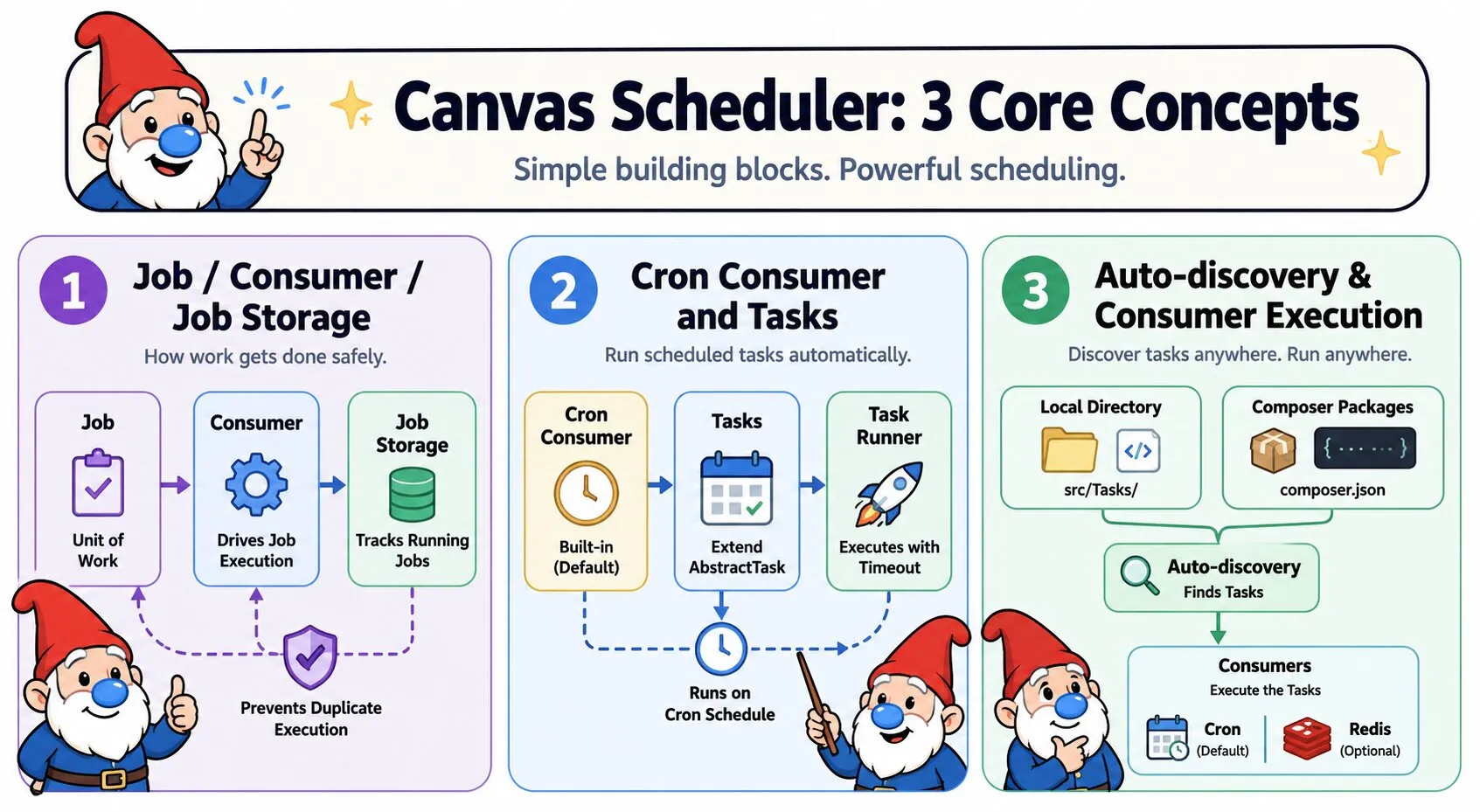
Core Concepts
- Job — The unit of work. All jobs implement
JobInterface, which defines execution (handle()), timeout, and retry behaviour. - Consumer — The component that drives job execution. The default consumer is cron-based; additional consumers (e.g. Redis, RabbitMQ) can be installed as separate packages and selected via
--consumer=redisor--consumer=rabbitmq. - Job Storage — A pluggable backend that tracks which jobs are currently running, preventing duplicate execution across processes or servers.
Cron Consumer
The cron consumer is built into Canvas and runs tasks on a schedule. It is the default consumer — no additional installation required.
Concepts
- Task — A cron-specific job. Extends
AbstractTaskand adds a schedule, name, description, and enabled state. Canvas discovers tasks automatically at runtime. - Schedule — A standard cron expression (
* * * * *) or a shorthand alias like@hourlythat controls when a task is eligible to run. - Task Runner — The component that executes a task with timeout enforcement. Canvas selects the best available strategy automatically based on your PHP environment.
Registering Tasks
Canvas discovers tasks from two sources automatically — no manual registration required:
Local directory — Place your task class in src/Tasks/ and Canvas will find it. This is the recommended approach for application tasks:
your-project/
└── src/
    └── Tasks/
        └── CleanupTask.php
To use a different directory, set scheduler_directory in config/app.php:
return [
    'scheduler_directory' => __DIR__ . '/../app/Tasks',
];
Composer packages — Tasks provided by packages are declared in composer.json under the scheduler family:
{
    "extra": {
        "discover": {
            "scheduler": {
                "provider": "Acme\\Tasks\\CleanupTask"
            }
        }
    }
}
Creating a Task
Extend AbstractTask and implement the four required methods. AbstractTask provides sensible defaults for timeout, retries, and failure handlers so you only write what matters:
use Quellabs\Canvas\Scheduler\Cron\AbstractTask;

class CleanupTask extends AbstractTask {

    public function getName(): string {
        return 'cleanup.temp-files';
    }

    public function getDescription(): string {
        return 'Removes temporary files older than 24 hours';
    }

    public function getSchedule(): string {
        return '0 3 * * *'; // Every day at 03:00
    }

    public function enabled(): bool {
        return true;
    }

    public function handle(): void {
        // Your task logic here
    }
}
Understanding the contract:
- getName() — A unique string identifier for the task. Used internally for concurrency locking, so it must be stable and unique across all tasks. Defaults to the class name in kebab-case if not overridden.
- getDescription() — A human-readable description shown in
scheduler:listoutput. - getSchedule() — A cron expression or shorthand alias. See Scheduling Reference below.
- enabled() — Return
falseto skip a task without removing it. Useful for environment-specific or temporarily disabled tasks. Defaults totrue. - handle() — The task's actual work. Canvas calls this when the task is due.
- getTimeout() — Maximum execution time in seconds. Defaults to 300 (5 minutes). Override to set a custom limit, or return
0to disable entirely.
Dependency Injection
Tasks are instantiated via Canvas's DI container, so constructor dependencies are autowired automatically:
use Quellabs\Canvas\Scheduler\Cron\AbstractTask;

class GenerateReportTask extends AbstractTask {

    public function __construct(
        private ReportService $reports,
        private MailerService $mailer
    ) {}

    public function getName(): string { return 'reports.generate-daily'; }
    public function getDescription(): string { return 'Generates and emails the daily report'; }
    public function getSchedule(): string { return '30 6 * * *'; }
    public function enabled(): bool { return true; }

    public function handle(): void {
        $report = $this->reports->generateDaily();
        $this->mailer->send('reports@example.com', $report);
    }
}
Handling Failures
AbstractTask provides empty default implementations of the failure callbacks. Override them to add custom behaviour — notifications, cleanup, or alerting:
use Quellabs\Contracts\Scheduler\TaskTimeoutException;

class CleanupTask extends AbstractTask {

    // ... required methods ...

    public function onFailure(\Exception $e): void {
        // Called when handle() throws any exception
        error_log("CleanupTask failed: " . $e->getMessage());
    }

    public function onTimeout(TaskTimeoutException $e): void {
        // Called specifically when the task exceeds getTimeout()
        error_log("CleanupTask timed out");
    }
}
A failed or timed-out task never prevents other tasks from running — each task is isolated. If a failure handler itself throws, the secondary exception is logged and the original failure result is still recorded.
Scheduling Reference
Canvas uses standard cron expressions with five fields: minute, hour, day of month, month, and day of week. In addition to numeric expressions, several shorthand aliases are supported:
@yearly    →  0 0 1 1 *   (once a year)
@annually  →  0 0 1 1 *   (same as @yearly)
@monthly   →  0 0 1 * *   (first day of each month)
@weekly    →  0 0 * * 0   (every Sunday at midnight)
@daily     →  0 0 * * *   (every day at midnight)
@hourly    →  0 * * * *   (every hour)
Common examples:
* * * * *       Every minute
*/5 * * * *     Every 5 minutes
0 * * * *       Every hour (on the hour)
30 2 * * *      Daily at 02:30
0 9 * * 1       Every Monday at 09:00
0 0 1 * *       First day of every month
Concurrency Protection
Canvas prevents a task from running more than once at the same time. When a task starts, a lock file is created in storage/scheduler/. Any subsequent scheduler invocation that finds that lock will skip the task for that cycle.
Locks are automatically released when the task finishes, whether it succeeds, fails, or times out. Stale locks — left by crashed processes — are detected via two mechanisms:
- Process check — On systems with POSIX support, Canvas checks whether the PID recorded in the lock file is still alive. If the process is gone, the lock is considered stale and removed.
- Timeout-based expiry — If the process cannot be checked, the lock expires after the configured lock timeout plus a 5-minute safety buffer.
Timeout Strategies
Canvas automatically selects the most capable timeout mechanism available on your system. You don't need to configure this:
- No timeout — Used when
getTimeout()returns0. The task runs until completion with no interruption. - PCNTL strategy — Preferred when the
pcntlextension is available. UsesSIGALRMsignals to interrupt the task at the exact timeout boundary. Efficient and low-overhead. - Process strategy — Fallback for environments without PCNTL (e.g., Windows, some shared hosts). Spawns the task in a child process and terminates it with SIGTERM, then SIGKILL if needed.
Note: The process strategy serializes the task object and passes it to a child PHP process. Ensure your task classes are serializable if you are not running on a PCNTL-capable system.
Running the Cron Consumer
Trigger the scheduler manually or from a system cron job:
./vendor/bin/sculpt scheduler:runThe recommended setup is to call this every minute from your system's crontab. Canvas evaluates each task's own schedule internally — the system cron simply acts as the heartbeat:
* * * * * cd /path/to/your/project && ./vendor/bin/sculpt scheduler:runTasks that are not yet due, already running, or disabled are silently skipped. Only tasks that pass all three checks — enabled, due, and not busy — are executed in that invocation.
Sculpt Commands
Two Sculpt commands support the cron consumer:
List all discovered tasks, their descriptions, and their schedules:
./vendor/bin/sculpt scheduler:list+------------------------+----------------------------------------+-------------+
| Name | Description | Schedule |
+------------------------+----------------------------------------+-------------+
| cleanup.temp-files | Removes temporary files older than 24h | 0 3 * * * |
| reports.generate-daily | Generates and emails the daily report | 30 6 * * * |
+------------------------+----------------------------------------+-------------+The list is sorted by frequency — most frequently scheduled tasks appear first.
Custom Job Storage
By default, Canvas stores lock and state files under storage/scheduler/ in your project root. To use a different location or implement an alternative backend (database, Redis, etc.), implement JobStorageInterface:
use Quellabs\Canvas\Scheduler\Storage\JobStorageInterface;

class RedisJobStorage implements JobStorageInterface {

    public function markAsBusy(string $jobName, \DateTime $dateTime): void {
        // Acquire a distributed lock in Redis
    }

    public function markAsDone(string $jobName, \DateTime $dateTime): void {
        // Release the lock
    }

    public function isBusy(string $jobName): bool {
        // Return true if the lock exists and has not expired
    }
}
Inspecting Results
When running the scheduler programmatically, run() returns an array of TaskResult objects — one per executed task:
$results = $scheduler->run();

foreach ($results as $result) {
    echo $result->getTaskName();   // 'cleanup.temp-files'
    echo $result->isSuccess();     // true or false
    echo $result->getDuration();   // execution time in milliseconds
    echo $result->getException();  // \Exception|null on failure
}
Redis Consumer
The Redis consumer allows jobs to be dispatched from application code and processed asynchronously by a long-running worker process. Install it as a separate package:
composer require quellabs/canvas-scheduler-redisConfiguration
Set the default queue driver in config/app.php:
return [
    'queue_driver' => 'redis',
];
Redis connection and queue settings go in config/scheduler-redis.php:
return [
    'scheme'         => 'tcp',
    'host'           => '127.0.0.1',
    'port'           => 6379,
    'queue_name'     => 'default',
    'queue_prefix'   => 'canvas',
    'queue_max_jobs' => 500,
    'queue_timeout'  => 5,
];
Creating a Job
Implement QueueableInterface on any class. Constructor parameters become the serializable payload — their names must match exactly, as the worker reconstructs the job via Canvas's DI container:
use Quellabs\Contracts\Scheduler\QueueableInterface;

class SendEmailJob implements QueueableInterface {

    public function __construct(
        private int    $userId,
        private string $template
    ) {}

    public function handle(): void {
        // Send the email
    }

    public function getPayload(): array {
        return [
            'userId'   => $this->userId,
            'template' => $this->template,
        ];
    }

    public function getTimeout(): int {
        return 30;
    }

    public function getMaxRetries(): int {
        return 3;
    }
}
getTimeout() returns the maximum number of seconds the job is expected to run. This value is stored in the job envelope for observability but is not enforced by the worker. Enforcement is the responsibility of the process supervisor — set stopwaitsecs in your Supervisord configuration to the longest expected job duration across all job types.
Dispatching Jobs
Inject QueueInterface into any controller or service — Canvas resolves it to the configured queue backend automatically:
use Quellabs\Contracts\Scheduler\QueueInterface;

class UserController {

    public function __construct(private QueueInterface $queue) {}

    public function register(Request $request): Response {
        // Handle registration...

        $this->queue->push(new SendEmailJob(
            userId: $user->id,
            template: 'welcome'
        ));

        return new Response('Registered');
    }
}
To explicitly request a specific queue driver regardless of the configured default, use contextual DI:
$queue = $container->for('redis')->get(QueueInterface::class);Running the Worker
Start the Redis worker via Sculpt:
./vendor/bin/sculpt scheduler:run --consumer=redisThe worker processes jobs until it reaches the configured queue_max_jobs limit (default: 500), then exits cleanly. Use Supervisord to keep it running in production:
[program:canvas-worker]
command=php /path/to/your/project/vendor/bin/sculpt scheduler:run --consumer=redis
directory=/path/to/your/project
autostart=true
autorestart=true
numprocs=2
user=www-data
stdout_logfile=/var/log/canvas-worker.log
stderr_logfile=/var/log/canvas-worker-error.log
stopwaitsecs=60
stopwaitsecs should be set to the longest expected job duration across all job types. Supervisord will send SIGKILL to any worker that has not stopped within this window after receiving SIGTERM.
Restart workers after deployment so they pick up new code:
supervisorctl restart canvas-worker:*Retry and Failure Handling
Failed jobs are retried up to getMaxRetries() times. Each retry increments the attempt counter and requeues the job. Jobs that exhaust all retries are moved to a failed list in Redis at {prefix}:failed:{queue_name}, for example canvas:failed:default with the default configuration.
Redis Key Layout
| Key | Purpose |
|---|---|
{prefix}:queue:{name} | Pending jobs |
{prefix}:failed:{name} | Failed jobs |
{prefix}:reserved:{name}:{id} | Currently executing job |
RabbitMQ Consumer
The RabbitMQ consumer allows jobs to be dispatched from application code and processed asynchronously by a long-running worker process. Install it as a separate package:
composer require quellabs/canvas-scheduler-rabbitmqConfiguration
Set the default queue driver in config/app.php:
return [
    'queue_driver' => 'rabbitmq',
];
RabbitMQ connection and queue settings go in config/scheduler-rabbitmq.php:
return [
    'host'           => '127.0.0.1',
    'port'           => 5672,
    'user'           => 'guest',
    'password'       => 'guest',
    'vhost'          => '/',
    'queue_name'     => 'default',
    'exchange_name'  => '',
    'queue_max_jobs' => 500,
    'prefetch_count' => 1,
];
exchange_name defaults to the empty string, which uses RabbitMQ's built-in default exchange and routes messages directly to the queue by name. Set this only if you are using a custom exchange topology.
prefetch_count controls how many unacknowledged messages each worker holds at once. The default of 1 gives the fairest work distribution when running multiple worker processes.
Creating a Job
Implement QueueableInterface on any class. Constructor parameters become the serializable payload — their names must match exactly, as the worker reconstructs the job via Canvas's DI container:
use Quellabs\Contracts\Scheduler\QueueableInterface;

class SendEmailJob implements QueueableInterface {

    public function __construct(
        private int    $userId,
        private string $template
    ) {}

    public function handle(): void {
        // Send the email
    }

    public function getPayload(): array {
        return [
            'userId'   => $this->userId,
            'template' => $this->template,
        ];
    }

    public function getTimeout(): int {
        return 30;
    }

    public function getMaxRetries(): int {
        return 3;
    }
}
getTimeout() returns the maximum number of seconds the job is expected to run. This value is stored in the job envelope for observability but is not enforced by the worker. Enforcement is the responsibility of the process supervisor — set stopwaitsecs in your Supervisord configuration to the longest expected job duration across all job types.
Dispatching Jobs
Inject QueueInterface into any controller or service — Canvas resolves it to the configured queue backend automatically:
use Quellabs\Contracts\Scheduler\QueueInterface;

class UserController {

    public function __construct(private QueueInterface $queue) {}

    public function register(Request $request): Response {
        // Handle registration...

        $this->queue->push(new SendEmailJob(
            userId: $user->id,
            template: 'welcome'
        ));

        return new Response('Registered');
    }
}
To explicitly request a specific queue driver regardless of the configured default, use contextual DI:
$queue = $container->for('rabbitmq')->get(QueueInterface::class);Running the Worker
Start the RabbitMQ worker via Sculpt:
./vendor/bin/sculpt scheduler:run --consumer=rabbitmqThe worker polls RabbitMQ for jobs until it reaches the configured queue_max_jobs limit (default: 500), then exits cleanly. Use Supervisord to keep it running in production:
[program:canvas-worker]
command=php /path/to/your/project/vendor/bin/sculpt scheduler:run --consumer=rabbitmq
directory=/path/to/your/project
autostart=true
autorestart=true
numprocs=2
user=www-data
stdout_logfile=/var/log/canvas-worker.log
stderr_logfile=/var/log/canvas-worker-error.log
stopwaitsecs=60
stopwaitsecs should be set to the longest expected job duration across all job types. Supervisord will send SIGKILL to any worker that has not stopped within this window after receiving SIGTERM.
Restart workers after deployment so they pick up new code:
supervisorctl restart canvas-worker:*Retry and Failure Handling
Failed jobs are retried up to getMaxRetries() times. On each failure the original message is rejected and a fresh message with an incremented attempt counter is published back to the pending queue. Jobs that exhaust all retries are published to a separate failed queue for inspection.
Queue Layout
| Queue | Purpose |
|---|---|
{queue_name} | Pending jobs |
{queue_name}.failed | Failed jobs |
Both queues are declared durable and messages are published as persistent, so jobs survive a RabbitMQ broker restart.
The Canvas Way: The Scheduler is driven entirely by auto-discovery and standard interfaces. Drop a task class into
src/Tasks/for cron execution, or implementQueueableInterfaceand injectQueueInterfacefor async queue processing — no configuration, no registration calls, no boilerplate.