 Canvas
Secure File Upload
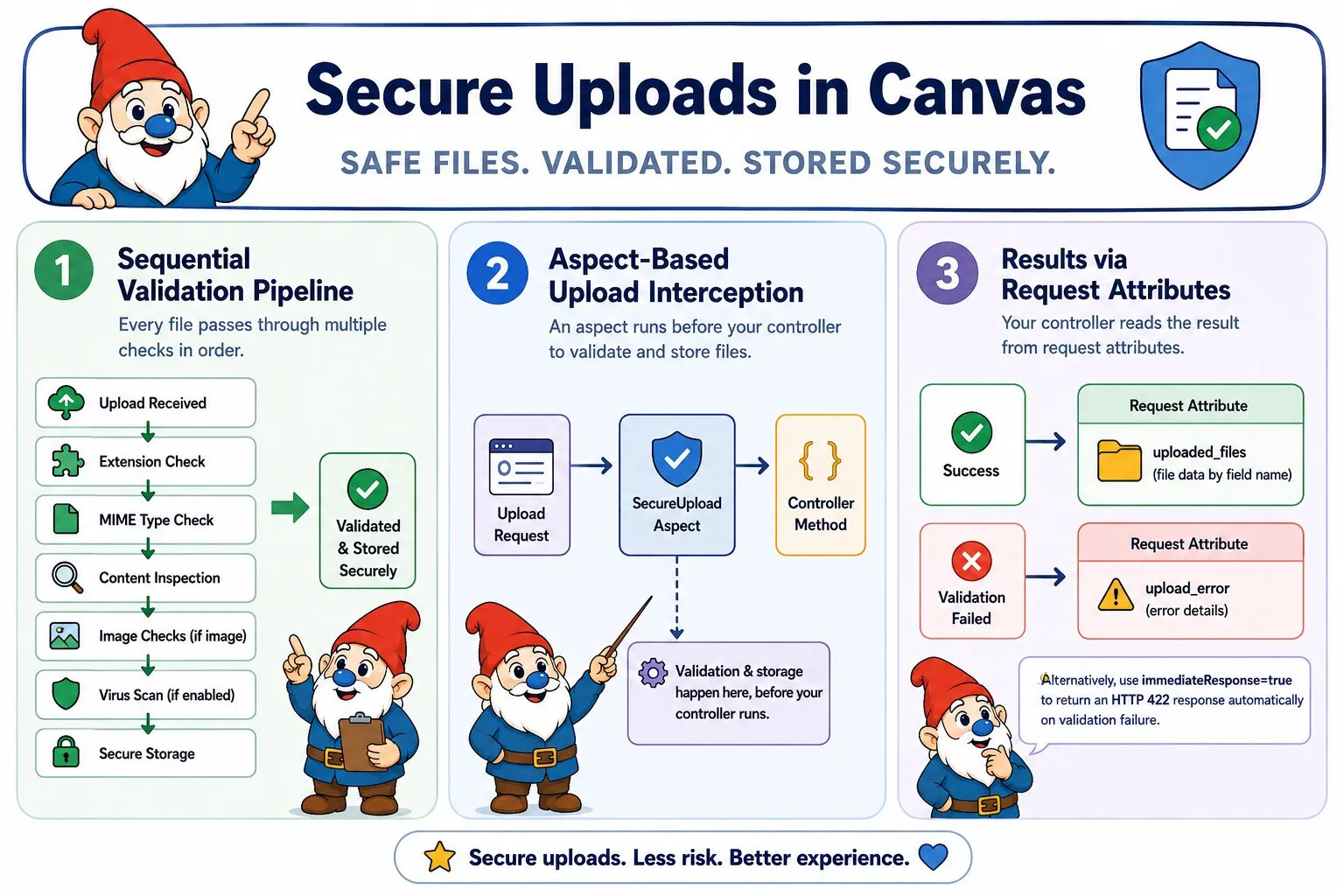
Secure file upload handling in Canvas uses a layered validation pipeline — extension checks, MIME type verification, content inspection, and optional virus scanning — before files reach your controller. Validated files are moved to secure storage outside the web root with randomized filenames and strict permissions.
File Upload Risks Explained
The Risk: File upload forms are one of the most dangerous surfaces in a web application. Without proper validation, attackers can upload PHP files disguised as images, exploit path traversal in filenames, exhaust disk space with oversized files, or plant content that executes when another user requests it.
Why Simple Extension Checks Are Not Enough: An attacker can rename shell.php to shell.jpg and bypass naive checks entirely. Effective protection requires verifying the actual file content, not just the name the client provided.
How Canvas Secure Upload Protection Works
Canvas runs every uploaded file through a validation pipeline before your controller sees it. Unlike a short-circuit pipeline, all checks run for every file — you get a complete list of every problem, not just the first one found. If any check fails, the file is never written to permanent storage.
- The PHP upload error code is checked first, catching partial uploads and missing temp directories. If this fails, no further checks run for that file
- Canvas validates the file size against the configured maximum
- Canvas checks the client-supplied extension against the allowed extensions whitelist
- Canvas checks the server-detected MIME type against the allowed MIME types whitelist
- Canvas cross-checks the extension and MIME type against each other to catch renamed files
- Canvas inspects the filename for directory traversal characters and dangerous compound extensions like
shell.php.jpg - For image files,
getimagesize()verifies the file is a real image whose content matches its declared type - For image files, Canvas checks pixel dimensions against the configured maximum
- If virus scanning is enabled and ClamAV is available, the file is scanned. If ClamAV cannot be reached, a warning is recorded and the upload proceeds
- The file is moved from the PHP temporary directory to permanent storage with a randomized filename and
0644permissions
Results for every file are placed in the request attributes under uploaded_files. Validation is all-or-nothing at the batch level: if any file fails, nothing is written to permanent storage and every record in uploaded_files will have success=false. Use throwOnFailure=true to throw a UploadException on any failure instead, letting Canvas's exception handler deal with the response.
Basic Usage
Add @InterceptWith(SecureUploadAspect::class) to any controller method that handles file uploads. The aspect runs the full validation pipeline and stores files before your method executes. How you handle the outcome depends on whether you want to inspect results yourself or have failures handled automatically.
Standard Mode
Your controller always executes. All files are validated first; if every file passes, they are all moved to permanent storage. If any file fails, nothing is stored — all records in uploaded_files will have success=false. Records for files that passed validation will have an empty errors array; only the failing files carry error messages:
/**
 * @Route("/media/upload", methods={"POST"})
 * @InterceptWith(SecureUploadAspect::class)
 */
public function upload(Request $request) {
    $uploadedFiles = $request->attributes->get('uploaded_files');

    foreach ($uploadedFiles['avatar'] as $file) {
        if (!$file['success']) {
            // Validation errors are in $file['errors']
            continue;
        }

        $this->mediaService->register($file);
    }

    return $this->redirect('/media/library');
}
Three request attributes report the outcome at the batch level:
upload_successful—trueonly if every file passed all checks and was storedupload_batch_error— non-null when the entire batch was rejected before processing (e.g. too many files);nullwhen failures are per-fileupload_warnings— aggregated warnings across all files (e.g."Virus scan skipped: ClamAV not found")
Exception Mode
Add throwOnFailure=true to throw an UploadException on any validation failure instead of writing results to request attributes and continuing. Your controller method is never called when validation fails — Canvas's exception handler takes over:
/**
 * @Route("/media/upload", methods={"POST"})
 * @InterceptWith(SecureUploadAspect::class, throwOnFailure=true)
 */
public function upload(Request $request) {
    // Only reached when all files passed validation
    foreach ($request->attributes->get('uploaded_files')['avatar'] as $file) {
        $this->mediaService->register($file);
    }

    return $this->redirect('/media/library');
}
The thrown UploadException carries the full per-file result set and the batch-level error so your exception handler can surface granular error information without re-running validation:
use Quellabs\Canvas\Security\Exceptions\UploadException;

// In your exception handler:
if ($e instanceof UploadException) {
    $batchError = $e->getBatchError();       // string|null — batch-level rejection reason
    $processedFiles = $e->getProcessedFiles(); // per-field, per-file result arrays
}
Note that request attributes are still populated before the exception is thrown, so the same information is also available via $request->attributes if your handler has access to the request.
When to use exception mode:
- API endpoints or simple upload forms where a generic error response is acceptable
- Situations where you want to guarantee the controller never runs on failure
- When you have a central exception handler that already formats error responses consistently
Security Measures
- Storage outside web root: The default path
storage/uploads/is outside the publicly accessible web root, so stored files cannot be requested directly through the browser. This is the primary execution prevention layer and works on all web servers. - Script execution prevention (Apache only): Canvas writes an
.htaccessfile into each storage directory that removes PHP and other script handler associations and explicitly denies access to script file extensions. This only works on Apache withAllowOverrideenabled — it provides no protection on Nginx, Caddy, Swoole, RoadRunner, or any other server. Do not rely on it as your sole protection. - File permissions: Stored files are set to
0644(owner read/write, others read-only), which prevents execution at the filesystem level on most server configurations. On filesystems wherechmodis not supported, a warning is recorded inupload_warningsand the upload still succeeds. - Content verification for images: PHP's
getimagesize()inspects the actual binary content of the file, not its extension or MIME type header. A file that does not parse as a valid image is rejected even if its extension and MIME type appear legitimate. Non-image formats are not subject to this check. - MIME type matching: Extension-to-MIME matching accounts for real-world platform variation. JPEG files may be reported as
image/jpegorimage/pjpeg; DOCX files may be detected asapplication/zipsince the format is a ZIP container. The MIME map accommodates these legitimate variations while still rejecting content that does not match the declared extension. - Compound extension detection: Filenames like
shell.php.jpgare caught by scanning every dot-separated segment of the filename for dangerous extensions, not just the final one. - Directory traversal prevention: Filenames containing
..,/, or\are rejected before any path is constructed. - Randomized filenames: Stored filenames are 32-character cryptographically random hex strings by default. This prevents collisions, makes stored files non-guessable, and ensures the extension is always lowercase regardless of what the client sent.
Configuration Parameters
| Parameter | Type | Default | Description |
|---|---|---|---|
uploadPath |
string | "storage/uploads" |
Base directory for stored files, relative to application root |
allowedExtensions |
array | jpg, jpeg, png, gif, pdf, doc, docx | Whitelist of permitted file extensions (case-insensitive) |
allowedMimeTypes |
array | JPEG, PNG, GIF, PDF, Word | Whitelist of permitted server-detected MIME types |
maxFileSize |
int | 5242880 (5MB) |
Maximum file size in bytes per file |
maxFiles |
int | 5 |
Maximum total number of files per request. Exceeding this rejects the entire batch before any file is processed |
virusScan |
bool | false |
Scan files with ClamAV before storage. If ClamAV is unavailable, a warning is recorded and the upload proceeds |
maxImageWidth |
int | 2048 |
Maximum pixel width for image files |
maxImageHeight |
int | 2048 |
Maximum pixel height for image files |
randomizeFilenames |
bool | true |
Generate cryptographically random storage filenames. The stored extension is always lowercase regardless of this setting |
directoryStructure |
string | "Y/m/d" |
PHP date() format string for subdirectory structure. Empty string disables subdirectories |
throwOnFailure |
bool | false |
Throw an UploadException on any validation failure instead of writing results to request attributes and continuing to the controller. The exception carries the full per-file result set |
File Record Fields
Each entry in uploaded_files is an associative array. Fields marked success only are absent on failed records; all other fields are always present:
| Field | Type | Description |
|---|---|---|
success |
bool | true if the file passed all validation and was stored successfully |
errors |
string[] | All validation error messages for this file. Empty on success |
original_name |
string | The filename as supplied by the client |
filename |
string | The actual filename on disk (randomized or sanitized, always lowercase extension). Success only |
path |
string | Full absolute path to the stored file. Success only |
relative_path |
string | Path relative to the application root. Success only |
size |
int | File size in bytes. Success only |
mime_type |
string | Server-detected MIME type. Success only |
extension |
string | Lowercased file extension. Success only |
uploaded_at |
string | Timestamp of successful storage in Y-m-d H:i:s format. Success only |