 Canvas
SignalHub
Canvas includes SignalHub, a Qt-inspired signal-slot system for decoupled event handling in PHP. Objects emit signals and connect them to handlers (slots) without tight coupling between components. If you are using signals inside Canvas controllers with @ListenTo auto-wiring, see Signal Wiring instead.
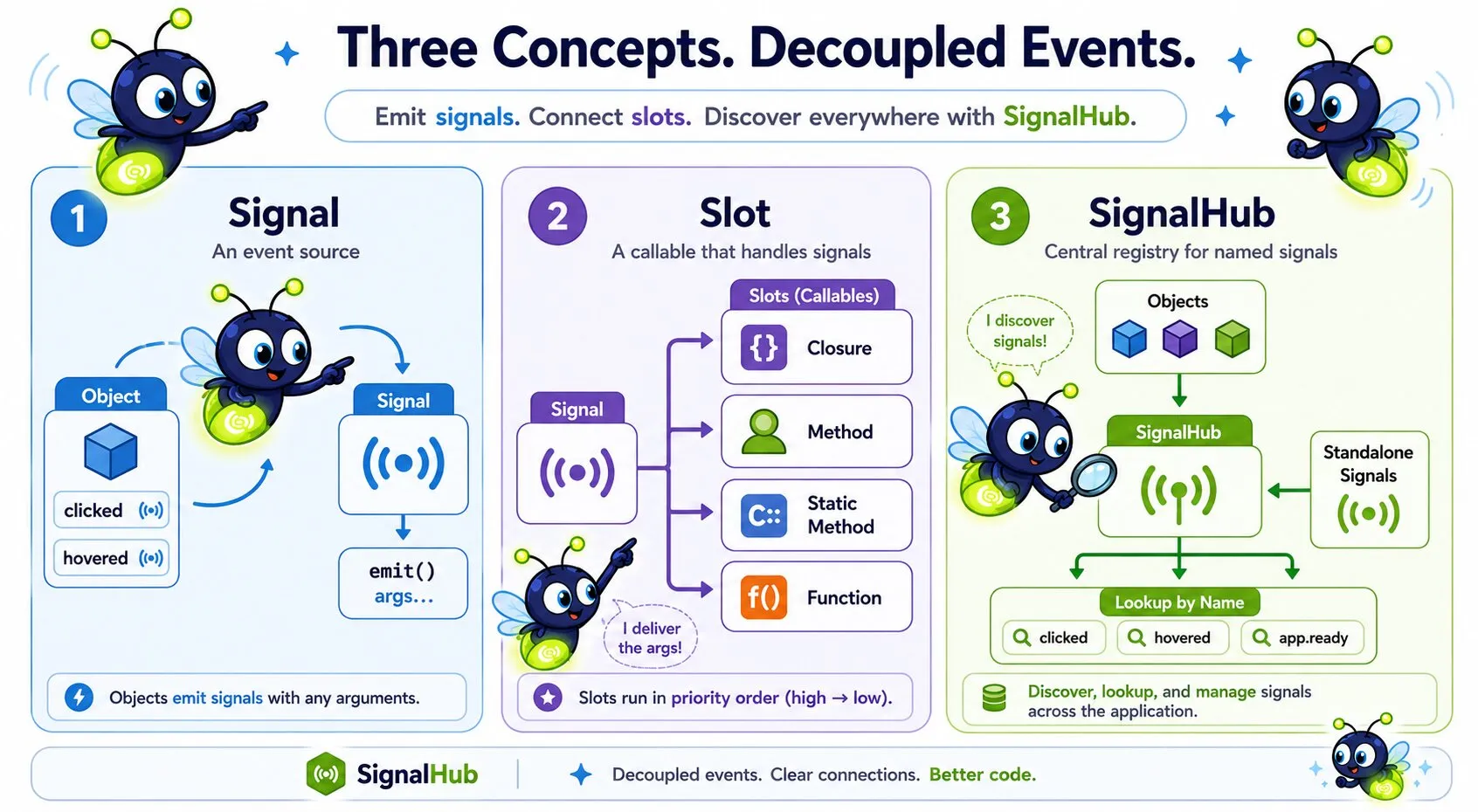
Core Concepts
- Signal — An event source connected to one or more slots. Declared as a typed property on a class and instantiated in the constructor.
- Slot — A wrapper around any callable (closure, method, function) that gives it stable object identity. Signal uses that identity to key connections, manage priorities, and enable explicit disconnection.
- SignalHub — A centralized registry that tracks named signals across the application. Discovers object-owned signals via reflection and supports manually registered standalone signals.
Adding Signals to a Class
Declare public Signal properties and initialize them in the constructor:
use Quellabs\SignalHub\Signal;

class Button {
    public Signal $clicked;
    public Signal $hovered;

    public function __construct() {
        $this->clicked = new Signal('clicked');
        $this->hovered = new Signal('hovered');
    }

    public function click(int $x, int $y): void {
        $this->clicked->emit($x, $y);
    }
}
The optional argument to new Signal() is the signal's name, used for hub registration and lookup. Unnamed signals can still be connected and emitted directly, but cannot be registered with the hub as standalone signals.
The Slot Wrapper
A Slot wraps any callable and gives it stable object identity. Signal uses that identity internally to key connections — not the callable itself. PHP closures and method references created from the same expression are distinct objects with no reliable equality, so keying by the Slot instance avoids ambiguity.
use Quellabs\SignalHub\Slot;

$slot = new Slot([$this, 'handleEvent']);
$signal->connect($slot);
$signal->disconnect($slot); // same instance required
A single Slot instance may be connected to multiple signals simultaneously. Each signal tracks its own priority for that connection independently. Signal holds a strong reference to each connected Slot, so a slot stays alive for as long as it is connected, regardless of whether the caller holds their own reference. To remove a connection, call disconnect() explicitly.
Connecting Slots
Wrap any callable in a Slot and connect it to a signal using connect():
use Quellabs\SignalHub\Slot;

$button = new Button();

// Closure
$slot = new Slot(function(int $x, int $y) {
    echo "Clicked at {$x}, {$y}";
});
$button->clicked->connect($slot);

// Object method
$slot = new Slot([$handler, 'onClicked']);
$button->clicked->connect($slot);

// Static method
$slot = new Slot(['MyClass', 'staticHandler']);
$button->clicked->connect($slot);

// Named function
$slot = new Slot('myHandlerFunction');
$button->clicked->connect($slot);
Slots execute in priority order, highest first. The default priority is 0:
$signal->connect($lowPrioritySlot, priority: -10);
$signal->connect($normalSlot);          // priority: 0
$signal->connect($highPrioritySlot, priority: 100);
Connecting the same Slot instance twice updates its priority rather than creating a duplicate connection. Two separate Slot objects wrapping the same callable are treated as distinct connections.
Emitting Signals
Call emit() with any arguments you want to pass to connected slots:
$button->clicked->emit(42, 17);Disconnecting Slots
Remove a specific slot from a signal by passing the same Slot instance that was used to connect:
$slot = new Slot([$handler, 'onClicked']);
$button->clicked->connect($slot);

// Later:
$button->clicked->disconnect($slot);
// Returns true if the slot was connected and removed, false otherwise
Because Signal keys connections by object identity, you must hold a reference to the Slot instance to disconnect it later. A Slot constructed inline and not assigned to a variable cannot be disconnected.
The SignalHub Registry
The SignalHub provides centralized discovery and management of named signals. Access the application-wide instance via the locator:
use Quellabs\SignalHub\SignalHubLocator;

$hub = SignalHubLocator::getInstance();
Canvas's dependency injection container is aware of SignalHub. Any class that type-hints SignalHub in its constructor receives the application-wide instance automatically — no locator calls needed inside the container.
Discovering Object Signals
Call discoverSignals() to register all Signal-typed properties on an object with the hub. The hub uses reflection to find them, caching results per class so reflection only runs once:
$button = new Button();
$hub->discoverSignals($button);
Calling discoverSignals() twice on the same object throws a RuntimeException. All Signal properties must be initialized before discovery — an uninitialized property also throws.
When an object is done (e.g. at the end of a request), unregister its signals explicitly:
$hub->unregisterSignals($button);Because SignalHub stores object signals in a WeakMap, they are garbage collected automatically when the owning object goes out of scope. Explicit unregistration is still recommended so that meta-signal listeners are notified and connections are cleaned up promptly.
Looking Up Signals
Retrieve a signal by name scoped to a specific owner:
// Direct object reference — O(1) lookup
$signal = $hub->getSignal('clicked', $button);

// Class or interface name — scans all registered objects for a match
$signal = $hub->getSignal('clicked', Button::class);

// No owner — searches standalone signals only
$signal = $hub->getSignal('app.ready');
Search for signals using wildcard patterns:
// All standalone signals starting with "data."
$signals = $hub->findSignals('data.*');

// All signals on a specific object instance
$signals = $hub->findSignals('*', $button);

// All signals on any object of a given class or interface
$signals = $hub->findSignals('*', Button::class);
One instance per class: The hub expects only one active instance of any given class at a time. When looking up signals by class name,
getSignal()returns the first match found. Register distinct signal names on distinct instances if you need to differentiate them.
Standalone Signals
Signals don't need to belong to an object. Register them directly with the hub for application-wide events:
$appReady = new Signal('app.ready');
$hub->registerSignal($appReady);

// Retrieve and connect from anywhere
$slot = new Slot(function(string $env) {
    echo "App started in {$env} mode";
});
$hub->getSignal('app.ready')->connect($slot);

$appReady->emit('production');
A standalone signal must have a name. Registering two standalone signals with the same name throws a RuntimeException. Unlike object signals, standalone signals are not garbage collected automatically — remove them explicitly when no longer needed:
$hub->unregisterSignal($appReady); // Returns true if found and removedHub Meta-Events
The hub emits its own signals when signals are registered or unregistered. Connect to these to monitor hub activity, implement audit logging, or auto-connect to signals as they appear:
$hub->signalRegistered()->connect(new Slot(function(Signal $signal) {
    echo "New signal registered: " . $signal->getName();
}));

$hub->signalUnregistered()->connect(new Slot(function(Signal $signal) {
    echo "Signal removed: " . $signal->getName();
}));
Meta-events fire for both object signals (via discoverSignals() / unregisterSignals()) and standalone signals (via registerSignal() / unregisterSignal()).
Introspection
Inspect signals at runtime:
$signal->getName();           // 'clicked', or null if unnamed
$signal->countConnections();  // Number of currently connected slots
$signal->isConnected($slot);  // True if the given Slot instance is connected
Testing
Inject a fresh hub during tests to isolate signal behavior:
// In test setup
SignalHubLocator::setInstance(new SignalHub());

// Reset after test
SignalHubLocator::setInstance(null);