 Canvas
Error Handlers
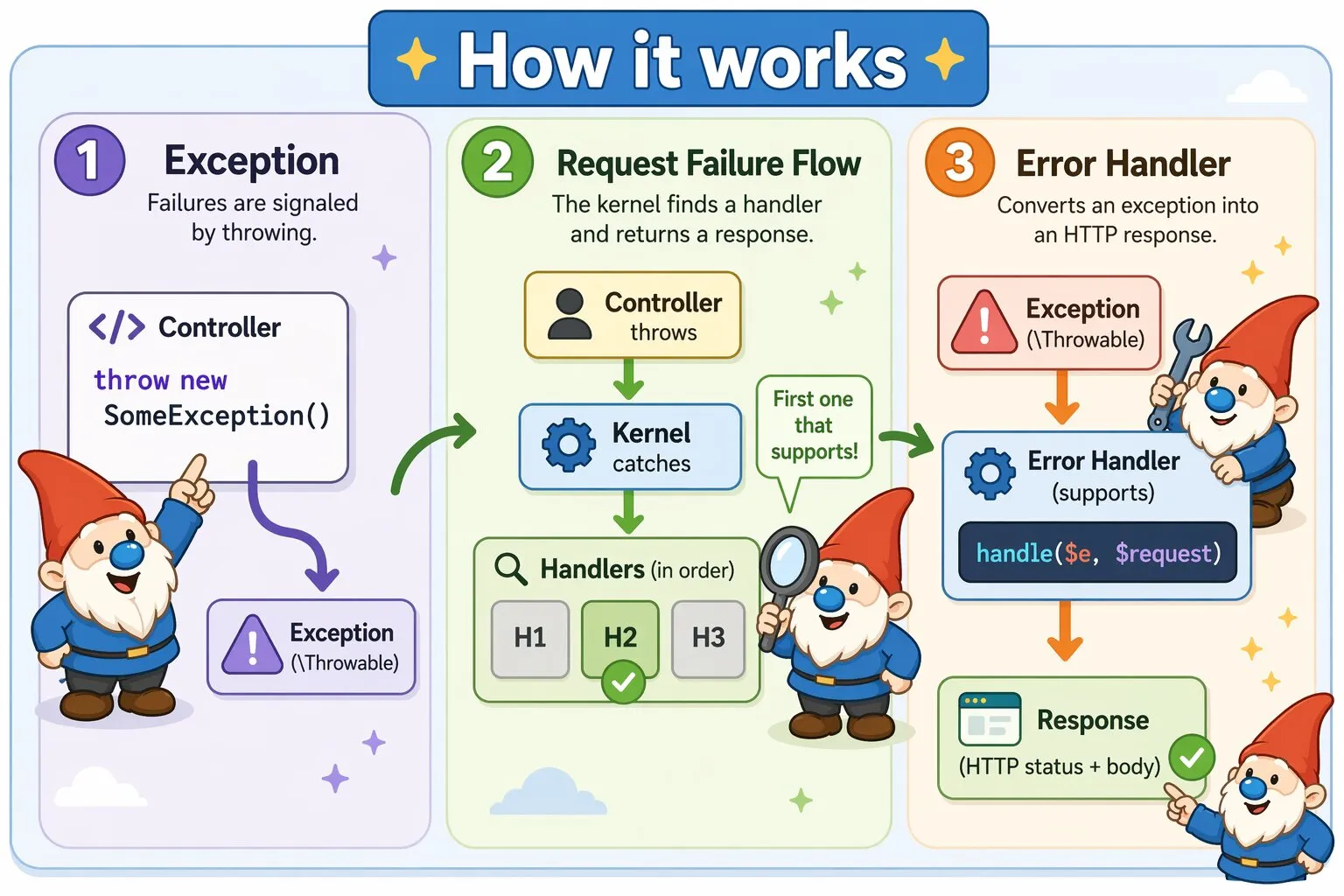
Canvas uses exception-driven error handling. Controllers throw exceptions to describe failures. The framework catches them and delegates response creation to error handlers.
Core Concepts
Error handling in Canvas revolves around two core concepts:
- Exception – Describes a failure (
\Throwable) - Error Handler – Converts an exception into an HTTP
Response
Request Failure Flow
- A controller throws an exception
- The Kernel catches it
- Error handlers are checked in the order they were discovered
- The first supporting handler returns a Response
- The Response is sent to the client
If no handler supports the exception, Canvas falls back to the default Kernel handler.
Framework Exceptions
Canvas throws specific exceptions for framework-level failures. For example:
Quellabs\Canvas\Exceptions\RouteNotFoundException
This exception is converted into an HTTP response (typically 404) by the error handling system.
Throwing Exceptions in Controllers
public function show(int $id) {
    $user = $this->userRepository->find($id);

    if (!$user) {
        throw new UserNotFoundException($id);
    }

    return $user;
}
Controllers focus on business logic and signal failures by throwing exceptions.
Creating an Error Handler
Error handlers implement Quellabs\Canvas\Error\ErrorHandlerInterface.
Use the exception code as the HTTP status when provided. Otherwise, default to 500.
Autowiring is allowed on the error handler's constructor.
Example
namespace App\Errors;

use Quellabs\Canvas\Error\ErrorHandlerInterface;
use Symfony\Component\HttpFoundation\Request;
use Symfony\Component\HttpFoundation\Response;

class UserNotFoundHandler implements ErrorHandlerInterface {
    public static function supports(\Throwable $e) {
        return $e instanceof UserNotFoundException;
    }

    public function handle(\Throwable $e, Request $request) {
        $status = $e->getCode() ?: 500;
        return new Response("User {$e->getUserId()} not found", $status);
    }
}
Guidelines
- Use descriptive class names
- Encode the HTTP status code via the exception code
- Keep the class focused on describing the error condition
Location
Place application-specific error handlers in: src/Errors/.
If desired the default location can be changed through the config/app.php configuration file.
<?php

    return [
        ...

        // Path to error handlers
        'error_handler_directory' => dirname(__FILE__) . '/../src/Errors',

        ...
    ];
Auto-Discovery
Canvas automatically discovers error handlers by scanning the src/Errors/ directory at boot. Any class
in that directory implementing ErrorHandlerInterface is registered without any manual configuration.
When an exception is thrown, Canvas calls supports() on each discovered handler in the order they
appear in the directory. The first handler that returns true handles the exception. If no handler
supports the exception, Canvas falls back to the default handler — see Default Handler below.
Default Handler
When no registered handler supports the thrown exception, Canvas uses its built-in default handler. Its behaviour depends on the environment:
- Development — Returns an HTML page with the exception message, file, line number, and full stack trace.
- Production — Returns a generic HTML page with no internal details exposed.
The response format is always HTML. If you need JSON error responses for API routes, write a handler that checks the request's Accept header and responds accordingly.
Simple Error Responses
For common cases where you just need to signal a 404 or 403 without a custom exception, BaseController provides convenience methods that return the appropriate response directly — no exception or handler required:
public function show(int $id): Response {
    $user = $this->em()->find(UserEntity::class, $id);

    if (!$user) {
        return $this->notFound('User not found');
    }

    if (!$this->canAccess($user)) {
        return $this->forbidden('Access denied');
    }

    return $this->render('users/show.tpl', ['user' => $user]);
}
Use custom exceptions and handlers when you need consistent handling across multiple controllers, logging, or richer error responses. Use notFound() and forbidden() for simple one-off cases.