 Canvas
 WakaPAC and Signals
Use Canvas signals to respond to actions in a WakaPAC component on the server. When a user clicks a button, the component can call a Canvas route that emits a named signal; its listeners then run application code, such as recording the action or sending a notification. The route returns a response so the component can show the result. This example walks through that flow.
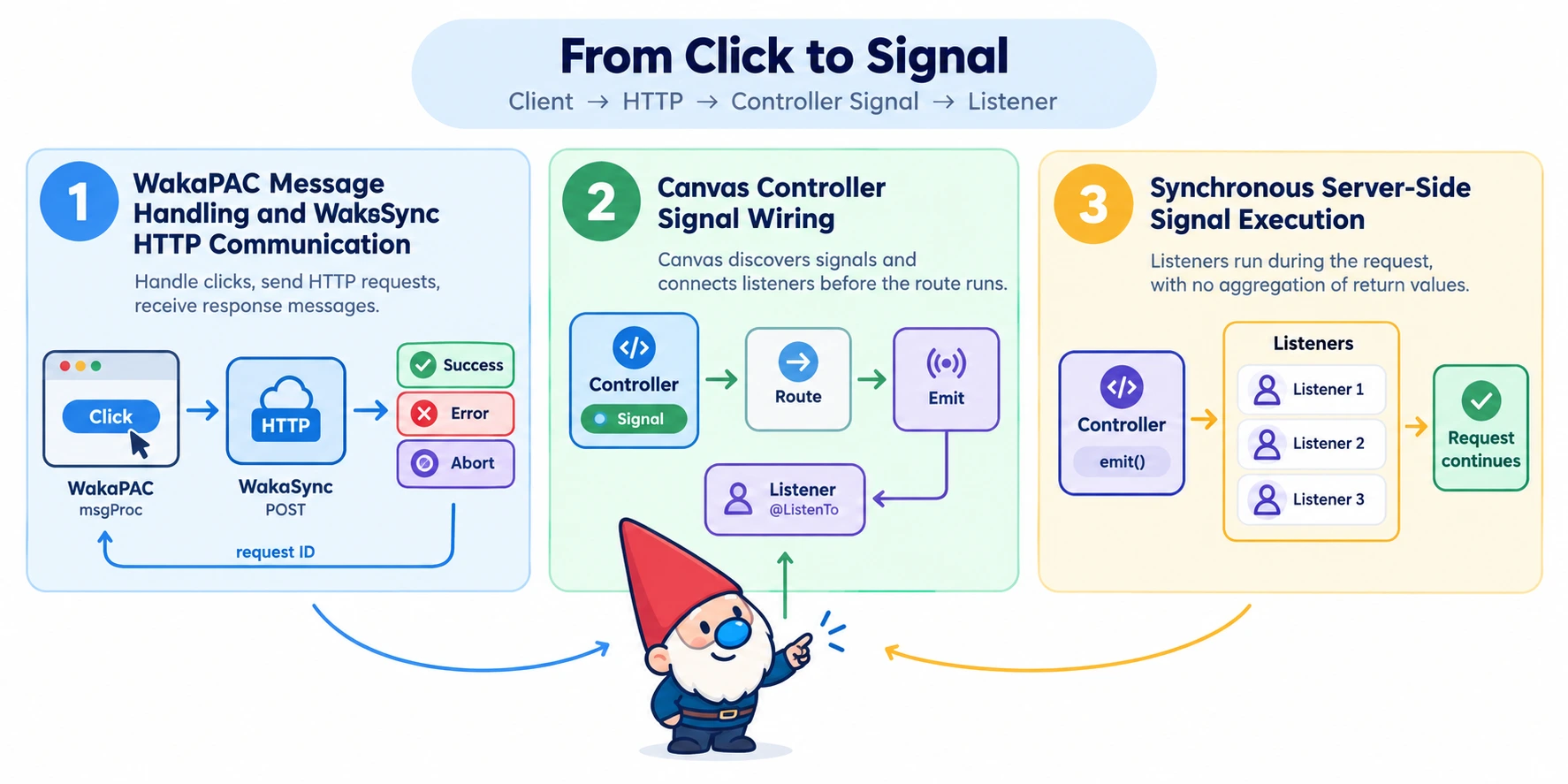
1. Send a selected message with WakaSync
Load WakaPAC and WakaSync, then register the plugin before creating the component.
<div id="signal-demo" data-pac-id="signal-demo">
    <button id="notify-server" type="button" data-pac-bind="enable: !pending">Notify server</button>
    <p>{{status}}</p>
</div>

<script src="https://cdn.jsdelivr.net/gh/quellabs/wakapac@main/wakapac.min.js"></script>
<script src="https://cdn.jsdelivr.net/gh/quellabs/wakapac@main/plugins/wakasync.min.js"></script>
<script>
wakaPAC.use(wakaSync);

wakaPAC('#signal-demo', {
    pending: false,
    status: '',
    _requestId: null,

    msgProc(event) {
        switch (event.message) {
            case wakaPAC.MSG_LCLICK:
                if (event.controlElement?.id !== 'notify-server' || this.pending) {
                    break;
                }

                this.pending = true;
                this.status = 'Sending...';
                this._requestId = this._http.post('/api/demo/button-click', {}, {
                    groupKey: null,
                    latestOnly: false
                });
                break;

            case wakaSync.MSG_HTTP_SUCCESS:
                if (event.wParam !== this._requestId) {
                    break;
                }

                this.pending = false;
                this.status = 'Server received the click.';
                break;

            case wakaSync.MSG_HTTP_ERROR:
            case wakaSync.MSG_HTTP_ABORT:
                if (event.wParam !== this._requestId) {
                    break;
                }

                this.pending = false;
                this.status = 'Request failed.';
                break;
        }
    }
});
</script>
WakaPAC turns the button click into MSG_LCLICK. The controlElement check makes this component opt in only for that button. WakaSync returns the request ID from post() and includes it in wParam on the resulting HTTP message, so the component can match the response to its request.
2. Emit a controller signal from a Canvas route
The route identifies the allowed action. It does not accept a signal name from the browser. Canvas discovers the initialized Signal property and connects matching listeners before calling buttonClick().
<?php
namespace App\Controllers;

use Quellabs\Canvas\Annotations\Route;
use Quellabs\Canvas\Controllers\BaseController;
use Quellabs\DependencyInjection\Container;
use Quellabs\SignalHub\Signal;
use Symfony\Component\HttpFoundation\JsonResponse;

class ButtonSignalController extends BaseController {
    public Signal $buttonClicked;

    /**
     * Initializes the controller's signal.
     * @param Container $container
     * @return void
     */
    public function __construct(Container $container) {
        parent::__construct($container);
        $this->buttonClicked = new Signal('demo.button.clicked');
    }

    /**
     * Emits the signal for this route.
     * @Route("/api/demo/button-click", methods={"POST"})
     * @return JsonResponse
     */
    public function buttonClick(): JsonResponse {
        $this->buttonClicked->emit();

        return $this->json(['ok' => true]);
    }
}
3. Handle the signal
Place the listener in src/Listeners, or in the configured signal listener directory. The listener runs during the POST request.
<?php
namespace App\Listeners;

use Quellabs\Canvas\Annotations\ListenTo;

class ButtonClickListener {
    /**
     * Records the example action.
     * @ListenTo("demo.button.clicked")
     * @return void
     */
    public function onButtonClicked(): void {
        error_log('Demo button clicked');
    }
}
Request behavior
WakaSync normally uses the component ID as its request group, so starting another request from the component cancels the previous browser request. groupKey: null with latestOnly: false leaves this action request independent. A browser cancellation would not guarantee that Canvas stopped processing an earlier POST. An ungrouped request also continues if its component is removed; WakaPAC drops its response message when the target component no longer exists.
The example disables the button while the request is pending. For actions where duplicate processing matters, also enforce idempotency on the server.
Apply the same authentication and permission checks you would use for any other POST route. See Security Overview for the available Canvas protections.
Signal::emit() invokes listeners synchronously and returns no result. The route's JSON response reports the outcome of the HTTP handler; it does not aggregate listener return values. Exceptions from listeners propagate through the request unless your application handles them.